Multi-Clock Work: A Framework for Creative Studio Operations
A three-band operating system (HF/LF/Dormant) for creative studios that protects deep work, reduces task starvation risk, and uses Bandit Scores to balance exploitation with exploration. Developed and tested at NullProof Studio.
Executive Summary
Creative studios juggle dozens of threads with wildly different temporal needs. Some demand rapid bursts; others mature best with slow, intermittent attention. The problem isn’t productivity—it’s temporal governance: matching work rhythms to work types.
Cross-domain research reveals a consistent pattern: protect deep bursts, dose low-frequency refresh, and govern flow with explicit limits.
Key findings from cognitive science:
- Incubation works—especially for divergent tasks—when you step away and re-expose later
- Attention residue and task-switching costs justify fewer switches and clean shutdown rituals
- Chronotype alignment improves output quality when fast vs slow work matches energy rhythms
From operations research:
- Multilevel Feedback Queues (MLFQ) and priority aging handle mixes of bursty and long jobs
- Kanban + WIP limits + Little’s Law stabilize cycle times
- Explore-exploit bandits provide cadence rules for creative bets
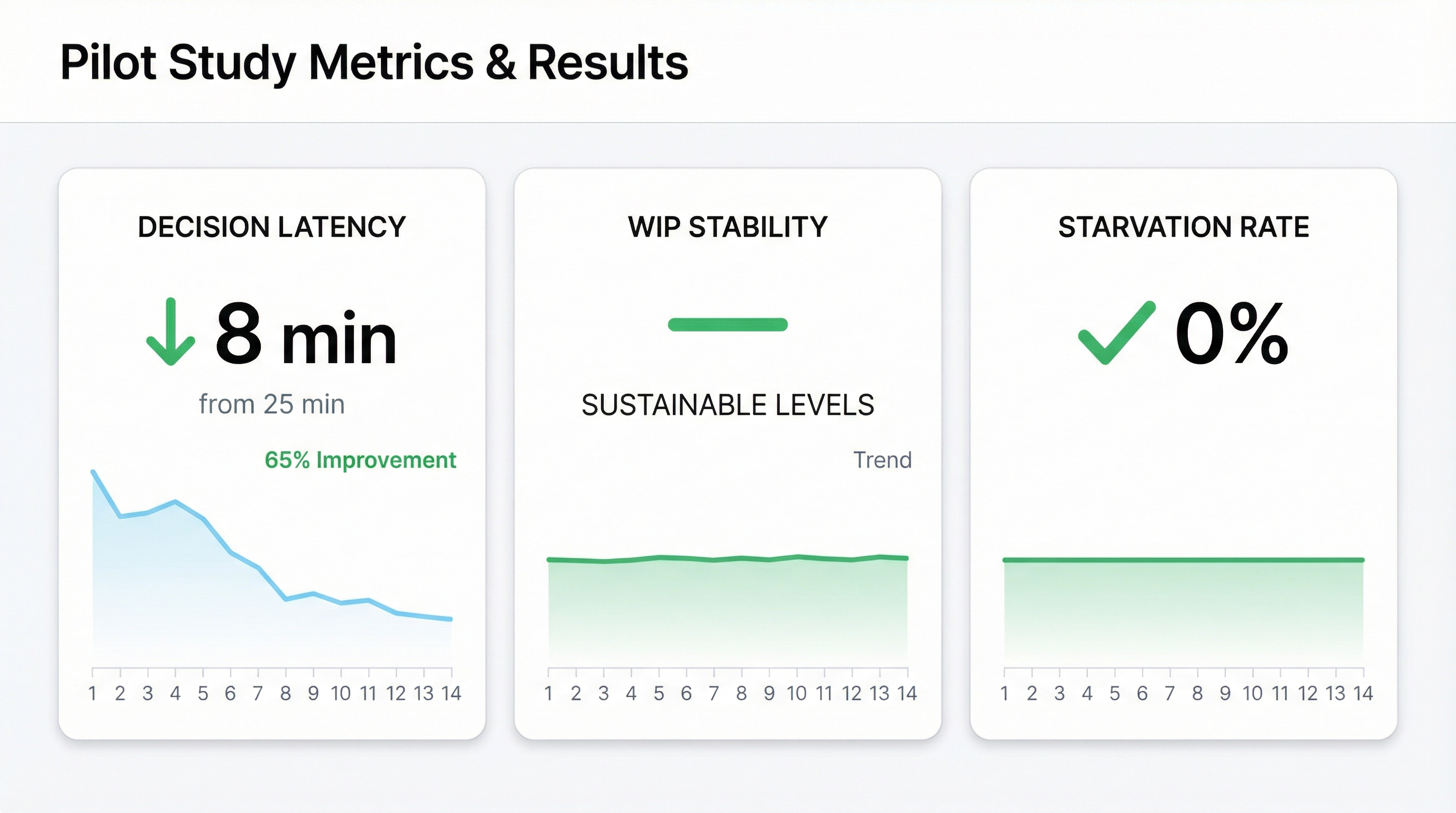
This paper documents Multi-Clock Work: a three-band operating system tested over a 14-week operational period at NullProof Studio. These results are from a small internal pilot in a specific tool stack and are not guaranteed outcomes. In our experience, decision latency dropped from 25 minutes to under 8 minutes. WIP stabilized at sustainable levels. No tasks were lost to starvation (as defined below) during the pilot.
Note on clock boundaries: The specific durations (daily, weekly, monthly) are contextual and adjustable. The value lies in explicit separation of rhythms, not exact time intervals.
Part I: The Problem
Why Calendars Lie to Creative Studios
Your calendar shows you where you’ll be. It doesn’t show you what state of mind you’ll need, how long you’ll take to context-switch, or whether today’s urgent meeting will cannibalize tomorrow’s creative momentum.
For creative studios, this mismatch is structural. A typical week might include:
- Client deliverables (deadline-driven, high stakes)
- Business development (sporadic, relationship-dependent)
- R&D exploration (no deadline, high uncertainty)
- Administrative maintenance (recurring, low cognitive load)
- Long-term strategic work (important but never urgent)
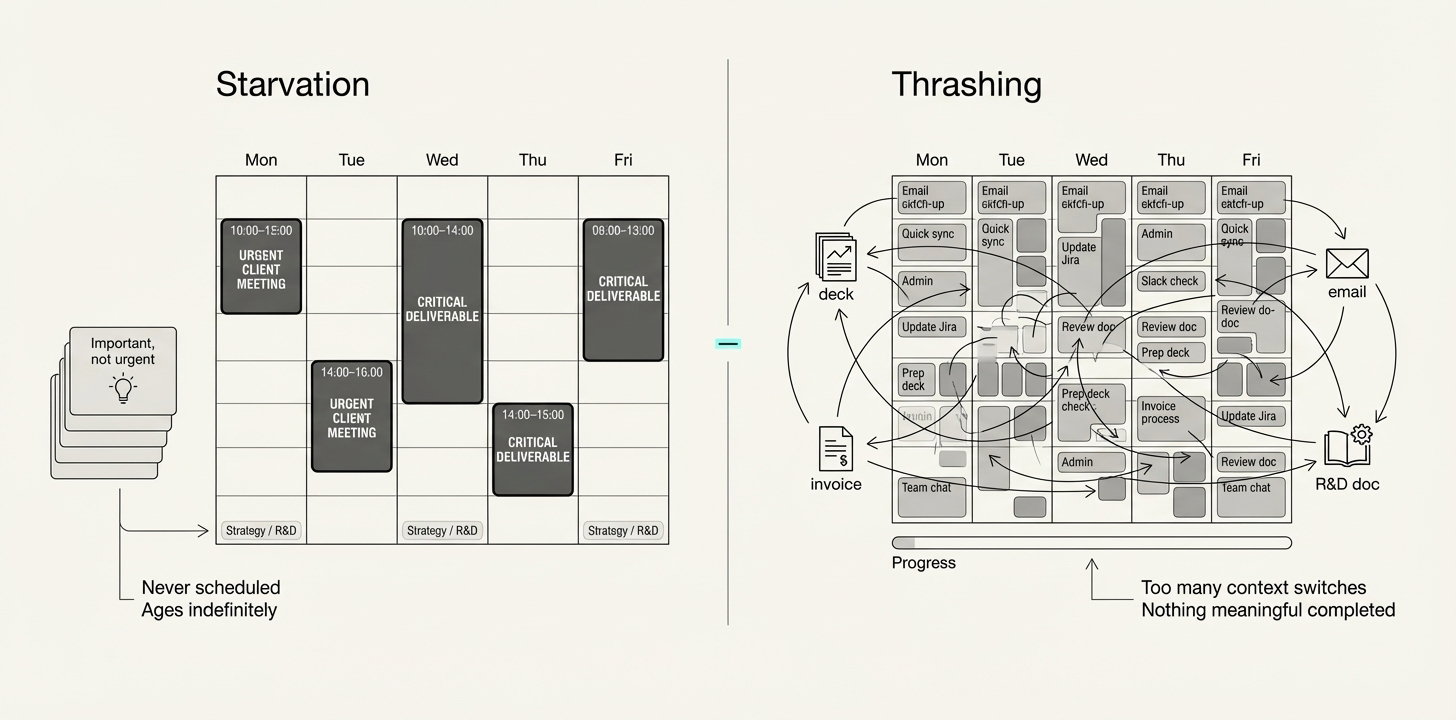
Each of these has a different natural rhythm. Forcing them onto one calendar creates two failure modes:
Starvation: Important-but-not-urgent work never gets scheduled. Research projects age indefinitely. Strategic thinking happens “when there’s time” (never).
Thrashing: Too many context switches per day. You start the client deck, check the email about the new lead, remember the invoice, open the R&D doc, and accomplish nothing meaningful on any of them.
The Temporal Governance Gap
Traditional project management treats all work as having the same clock. Daily standups. Weekly sprints. Monthly reviews. The cadence is uniform; only the content changes.
But creative work doesn’t operate on uniform time:
| Work Type | Natural Rhythm | Calendar Fit |
|---|---|---|
| Client delivery | Days to weeks | ✅ Good |
| Active R&D | 2-4 week cycles | ⚠️ Partial |
| Strategic planning | Quarterly | ❌ Poor |
| Exploratory ideas | Months to years | ❌ Very poor |
| Skill development | Ongoing | ❌ Invisible |
The gap isn’t in task management—we have plenty of tools for that. The gap is in temporal governance: a system that respects different work rhythms while ensuring nothing starves.
Part II: The Framework
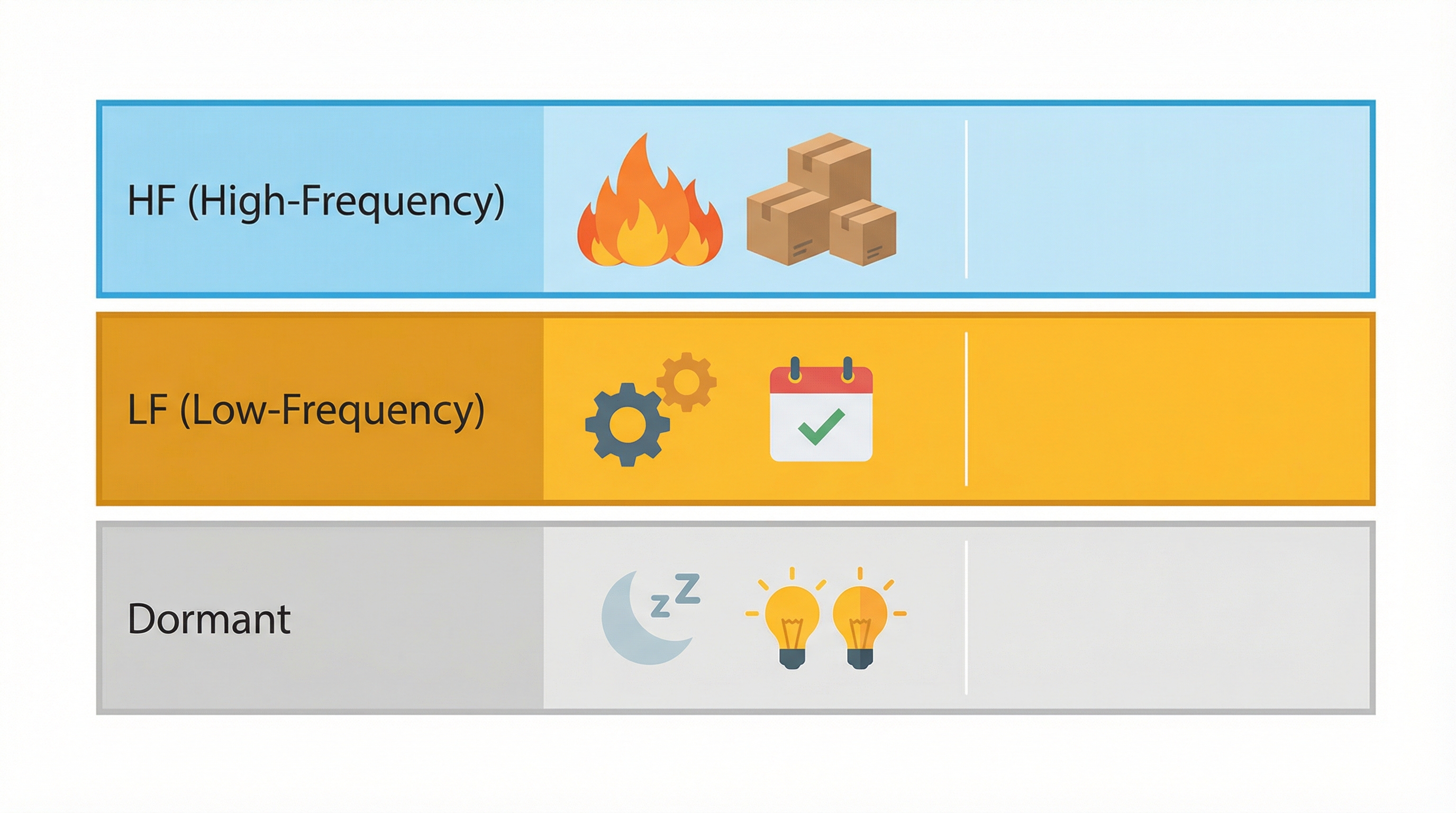
Three Frequency Bands
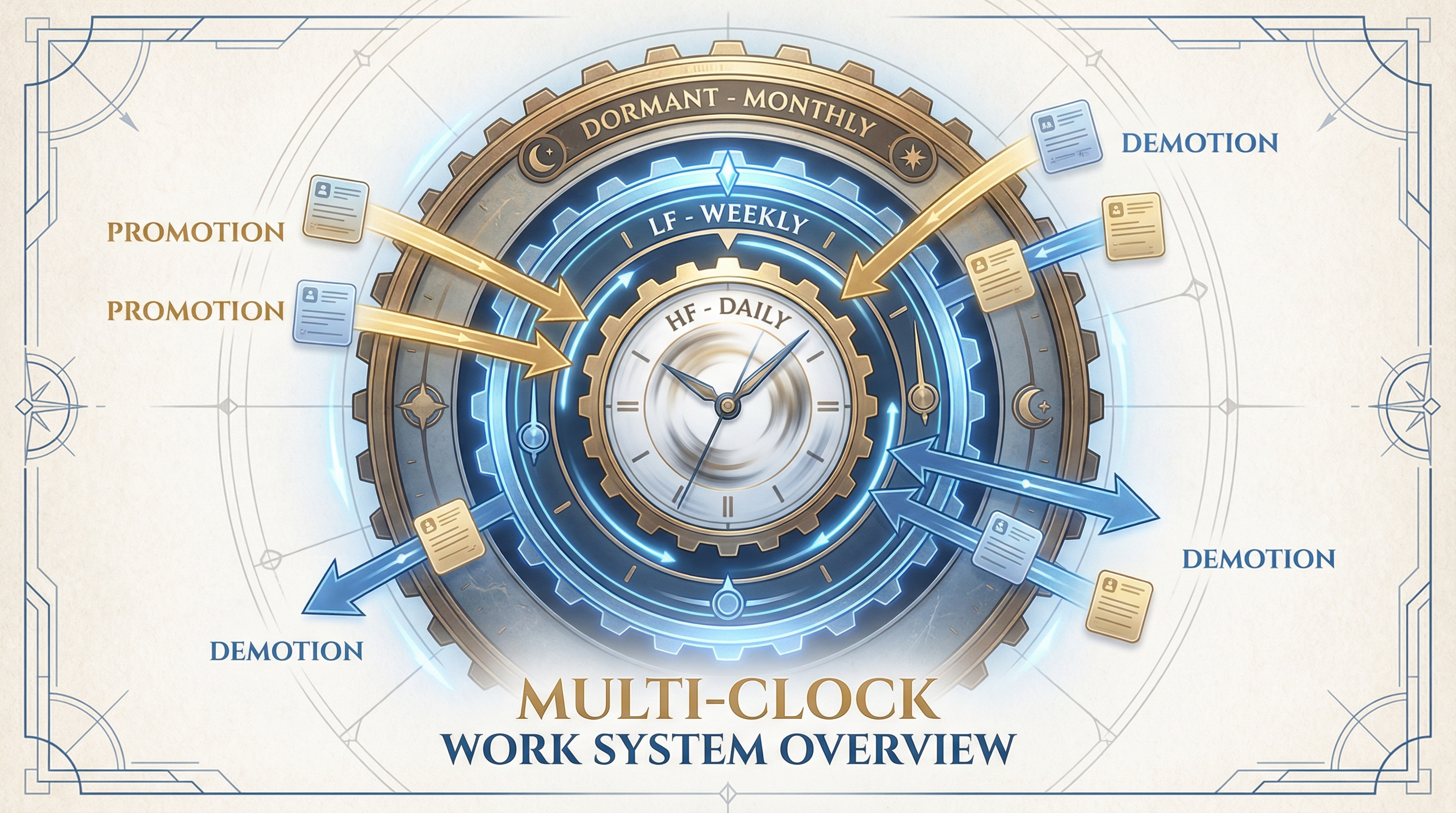
Multi-Clock Work assigns every thread to one of three frequency bands based on its natural review rhythm:
HF (High-Frequency): Work requiring attention multiple times per week. Typically tied to shipping, client deadlines, or active production. Examples: client deliverables, content publishing, active development sprints.
LF (Low-Frequency): Work touched every 2-6 weeks for meaningful refresh. Requires dedicated time but not daily attention. Examples: strategic planning, relationship nurturing, skill development, ongoing R&D.
Dormant: Parked concepts with periodic review (monthly to quarterly). Not abandoned—deliberately incubating. Examples: future product ideas, speculative partnerships, long-term research questions.
The Multi-Clock Idea Register (MIR)
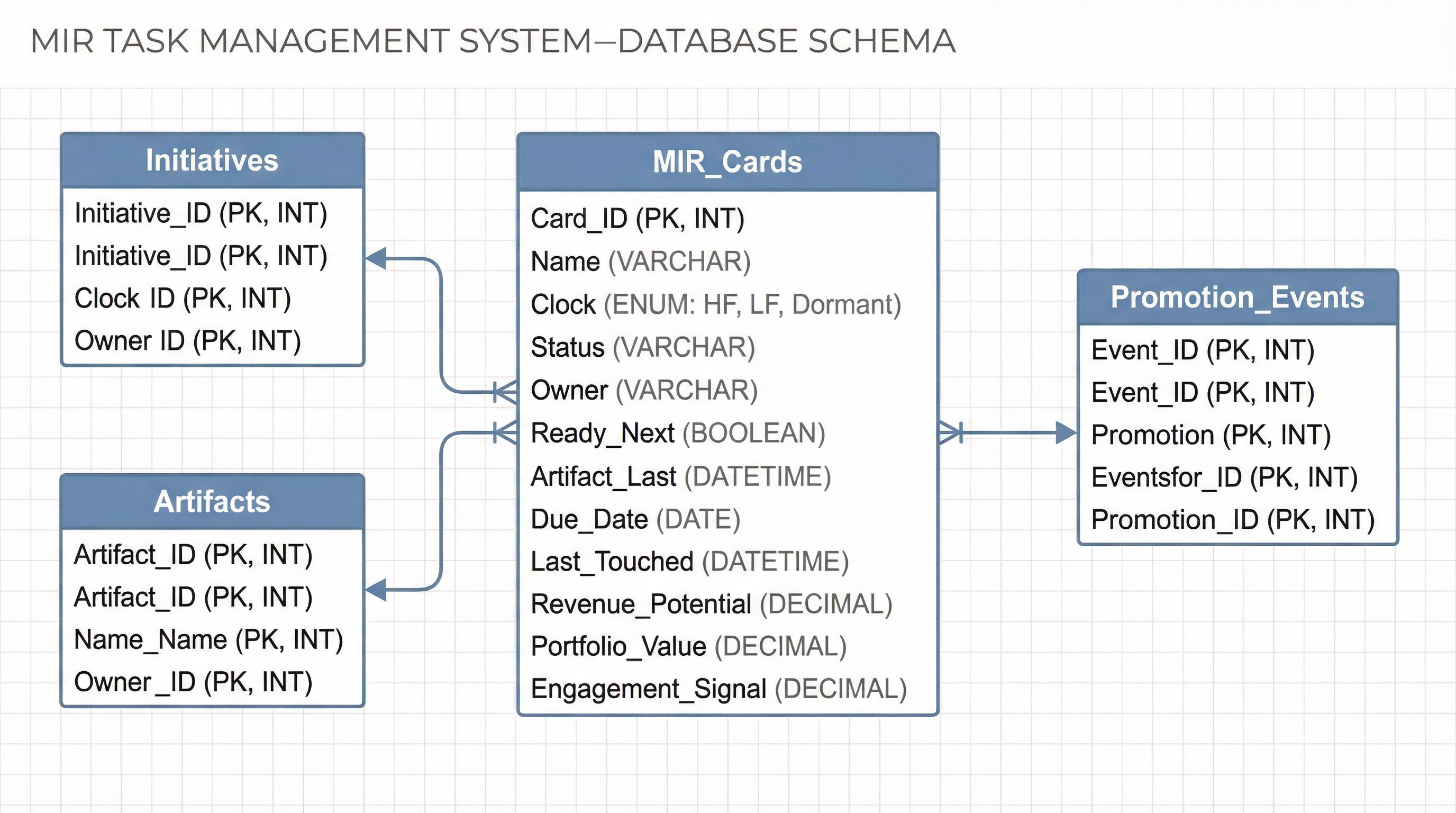
The MIR is the operational database implementing Multi-Clock Work. Every thread carries explicit attributes:
Core Properties:
- Clock (HF/LF/Dormant): Which frequency band
- Status (Not Started/Active/Paused/Blocked/Done): Administrative state
- Owner: Accountability assignment
- Domain: Work category (Client, R&D, Operations, etc.)
Execution Properties:
- Ready Next: Immediate next action to restart work
- Artifact Last: Most recent deliverable or milestone
- Due Date: Hard deadline (if any)
- Last Touched: When work last occurred
Scoring Properties:
- Revenue Potential (0-3): Direct or indirect revenue path
- Portfolio Value (0-3): Long-term capability or brand equity
- Engagement Signal (0-3): External validation or interest
- Is Exploration (checkbox): First-time experiment flag
The Bandit Score System
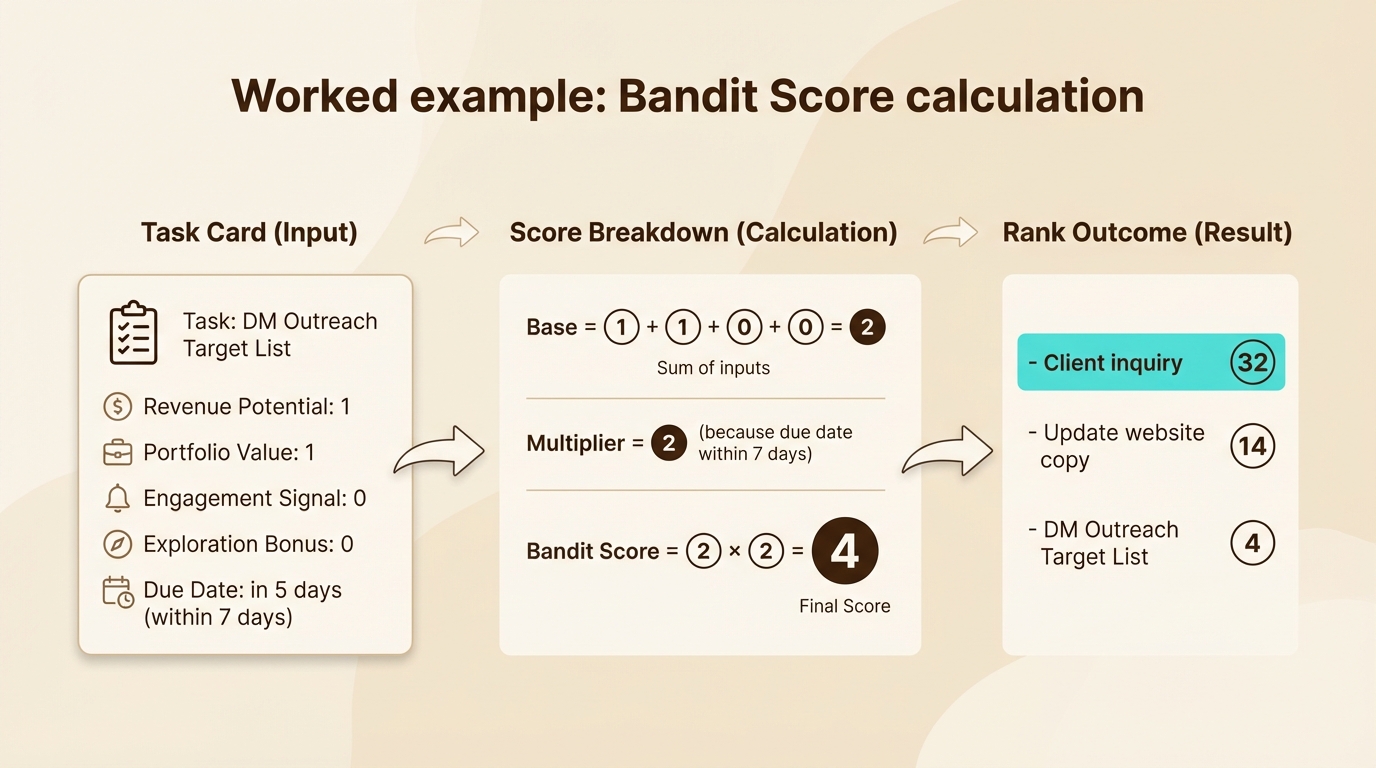
With multiple threads competing for attention, how do you decide what to work on next? The Bandit Score provides a composite prioritization metric.
The Formula:
Base = Revenue Potential + Portfolio Value + Engagement Signal + Exploration Bonus
Multiplier = Due Date within 7 days ? 2 : 1
Bandit Score = Base × Multiplier
Score Interpretation:
| Range | Priority | Action |
|---|---|---|
| 16-22 | Critical | Work on immediately (HF today) |
| 12-15 | High | Schedule within 2-3 days |
| 8-11 | Medium | Good LF refresh candidate |
| 4-7 | Low | Dormant or far-future LF |
| 0-3 | Minimal | Consider archiving |
The ε-Greedy Strategy:
- 90% of the time: Pick the highest Bandit Score (exploit known winners)
- 10% of the time: Work on something with the Exploration flag (explore new territory)
This prevents the system from only rewarding proven work. Innovation requires trying new things, even when current work is performing well.
WIP Limits: The Governing Constraint
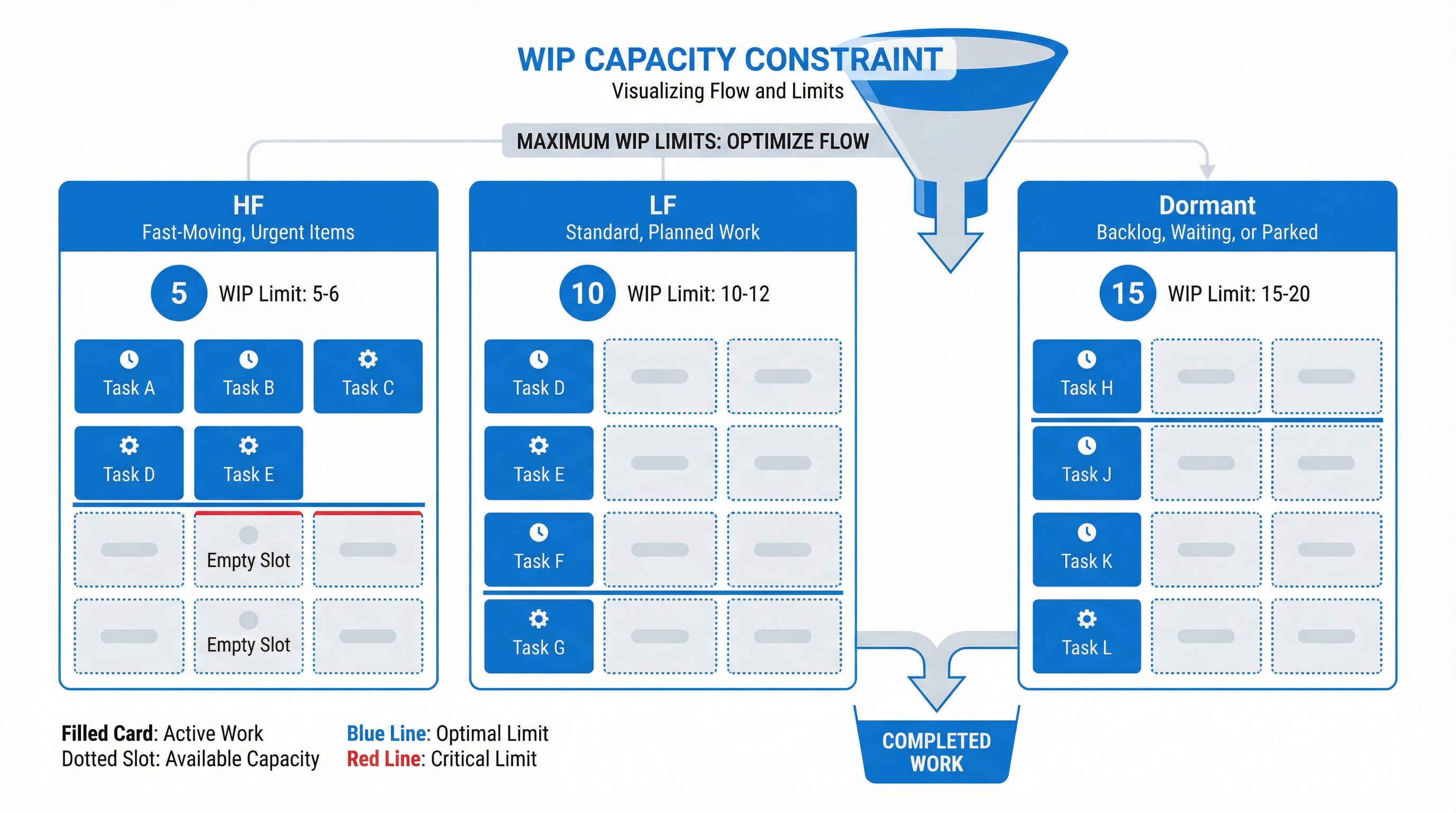
Without explicit limits, work-in-progress inflates until everything moves slowly. Little’s Law makes this precise:
Cycle Time = WIP ÷ Throughput
To reduce cycle time without increasing throughput (more effort), you must reduce WIP.
Recommended Limits:
| Clock | Max Items | Rationale |
|---|---|---|
| HF | 3-6 per person | Protects focus; forces completion |
| LF | 8-12 per person | Allows breadth without overwhelm |
| Dormant | 15-20 per person | Generous but not infinite |
Enforcement Protocol:
- If cycle time rises for 2+ consecutive reviews, reduce WIP before adding new items
- Studio-wide cap: Active HF ≤ team_size × 3
Aging and Automatic Promotion
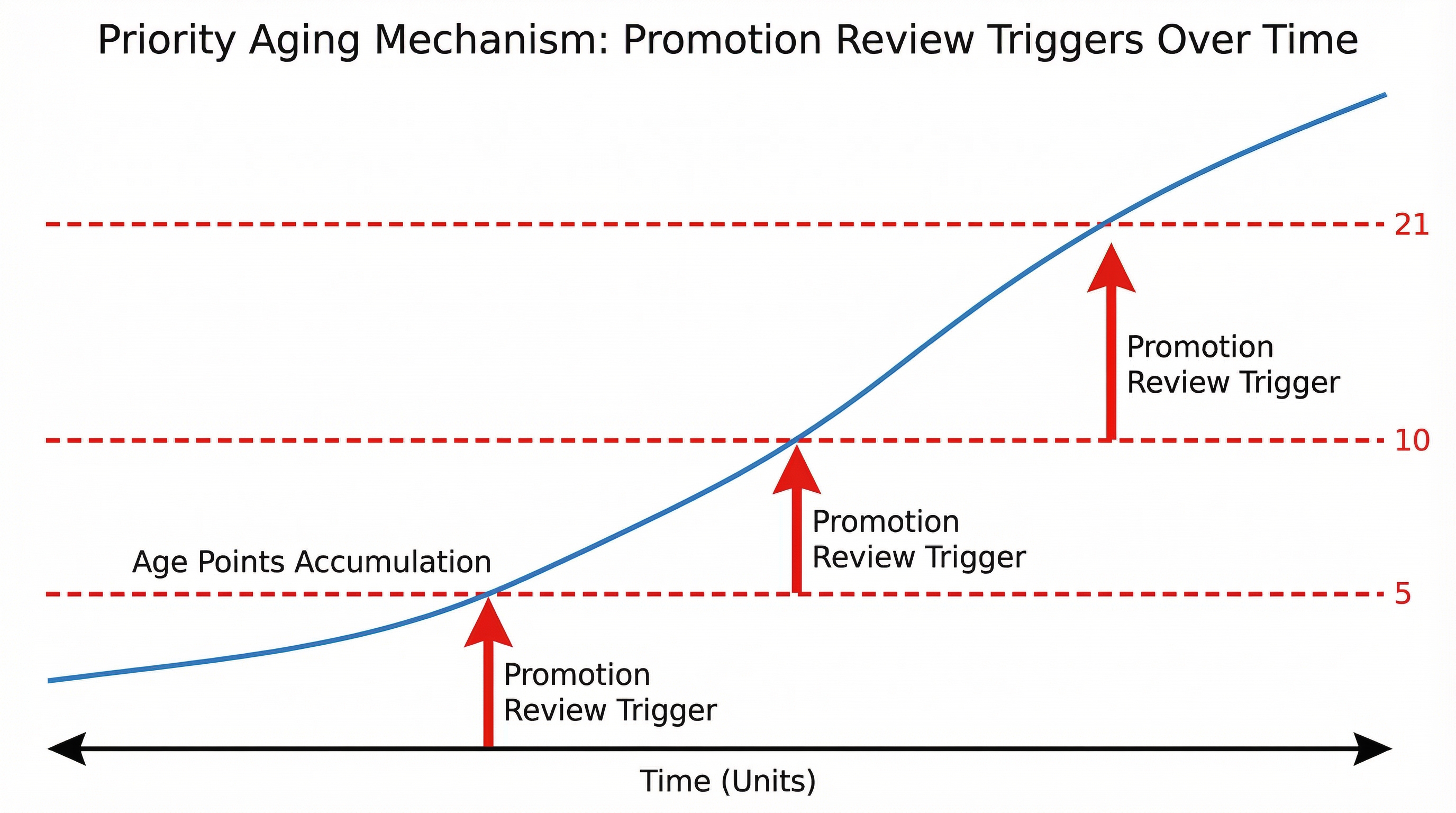
The failure mode of any prioritization system is starvation: low-priority items wait forever. Multi-Clock Work prevents this through priority aging.
How Aging Works:
- Every day an item isn’t touched, it accumulates Age Points
- Dormant items: +1 point/day
- LF items: +0.5 points/day
- HF items: +0.1 points/day (slower aging since actively worked)
Aging Thresholds:
| Clock | Threshold | Meaning |
|---|---|---|
| Dormant | 21 points (~3 weeks) | Surfaces for promotion review |
| LF | 10 points (~20 days) | Surfaces for “try or kill” decision |
| HF | 5 points (~50 days) | Catches stalled “active” work |
When an item crosses its threshold, it’s flagged for promotion review: either advance it to a higher-frequency clock, take decisive action, or explicitly extend its dormancy.
Value Streams: Portfolio Balance
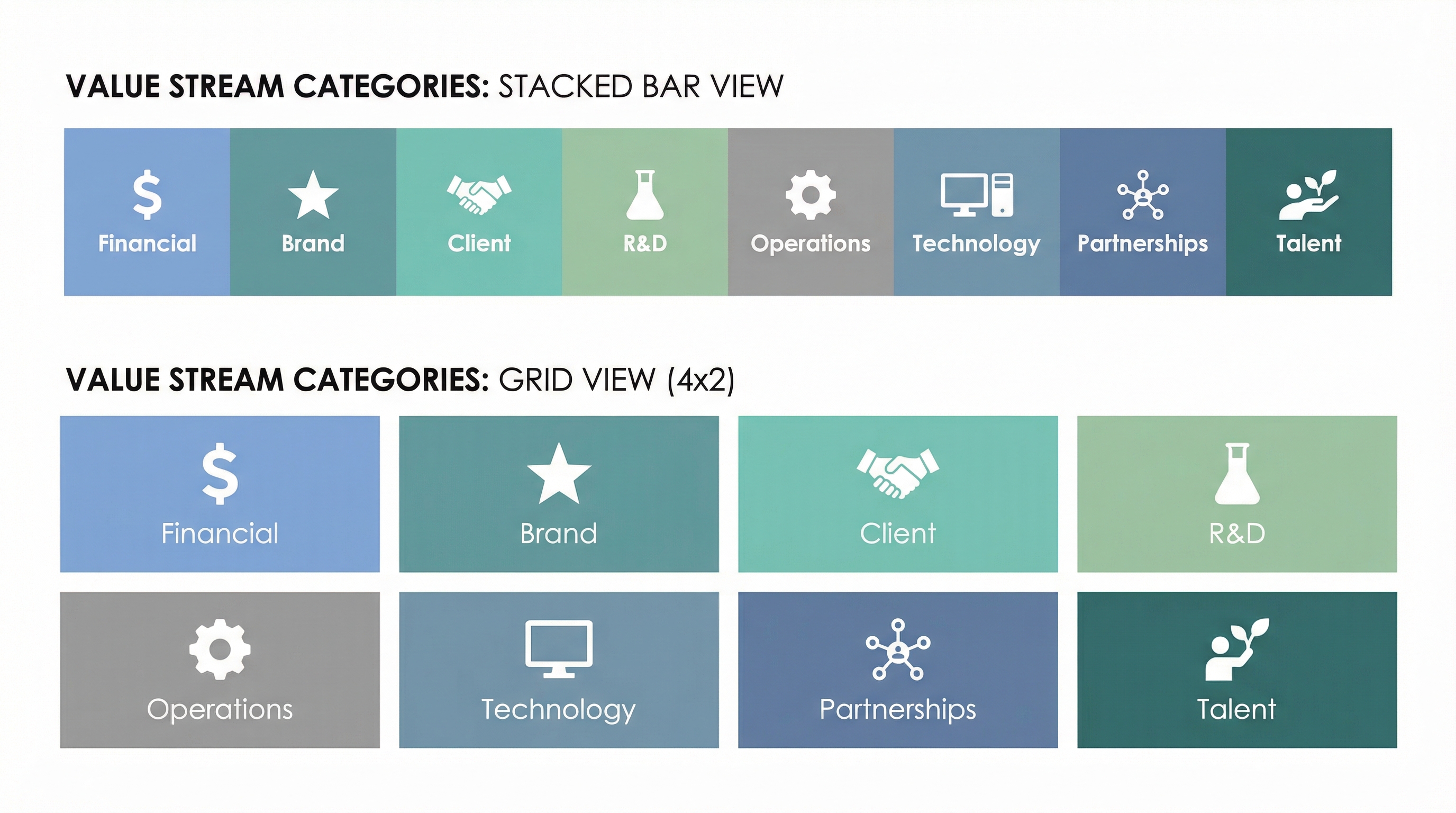
Beyond individual task management, Multi-Clock Work tracks portfolio balance across eight value streams:
- 💰 Financial Performance & Sustainability — Revenue, cost management
- 🖼️ Brand & Cultural Capital — Reputation, positioning, content
- 🤝 Client & Collector Delivery — Direct customer work
- 🧪 R&D & Product Innovation — Experimentation, new offerings
- 🧭 Governance & Operations — Process, compliance, efficiency
- 💻 Technology & Platform Enablement — Infrastructure, tooling
- 🌐 Partnerships & Ecosystem — External relationships
- 🌱 Talent & Capability Growth — Team development, skills
Every MIR item tags to a value stream. Rollup views reveal imbalances: too much client work crowding out R&D, or operations consuming innovation capacity.
Part III: Theoretical Foundations
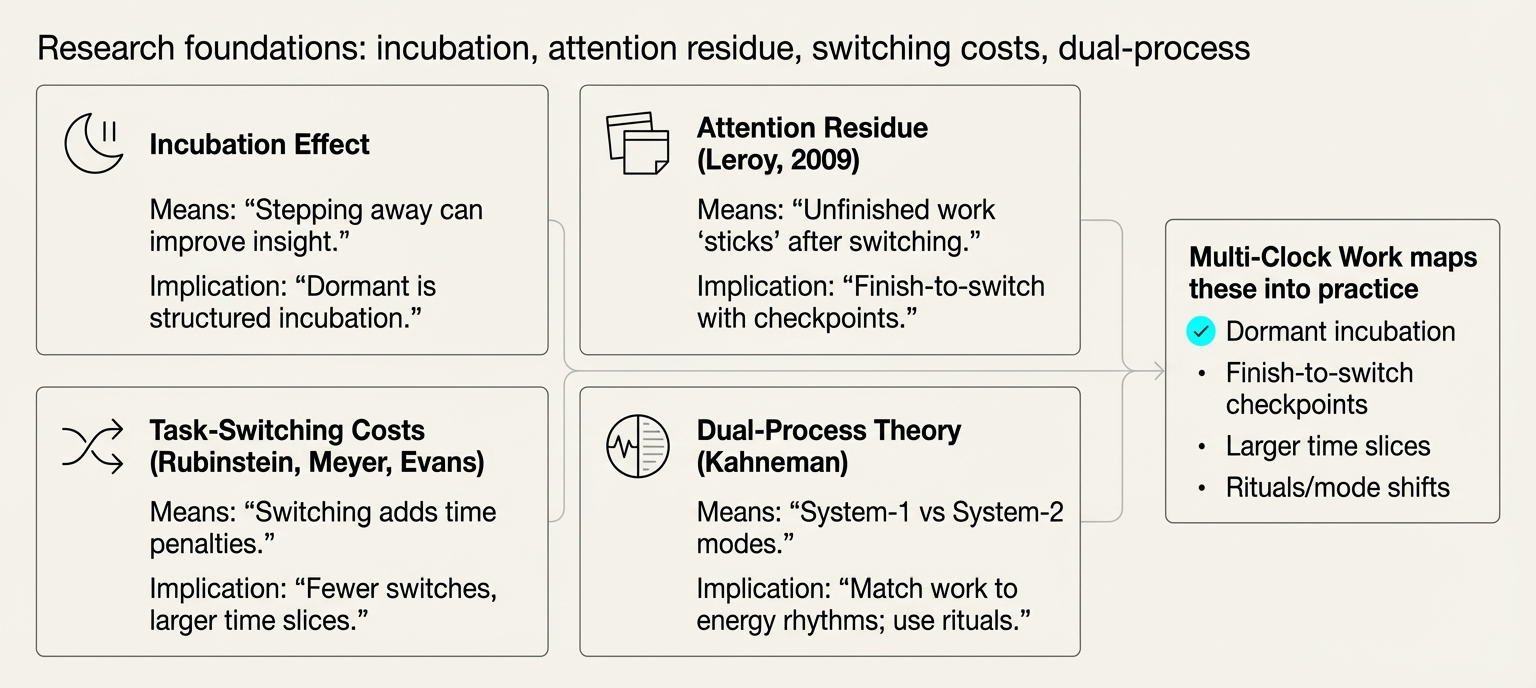
Cognitive Science: Design Heuristics
Multi-Clock Work draws on findings from cognitive psychology, creativity research, and organizational behavior. These inform design heuristics rather than claiming neuroscientific precision.
Incubation Effect (Sio & Ormerod, 2009): Meta-analyses suggest positive incubation effects—especially for divergent tasks—when you set a problem aside and return later. The Default Mode Network (DMN) research by Raichle and Andrews-Hanna is associated with internally directed thinking during rest periods. Design implication: Dormant isn’t neglect; it’s structured incubation with scheduled return.
Attention Residue (Leroy, 2009): Studies indicate that leaving Task A unfinished reduces performance on Task B—cognition “sticks” to the incomplete task. In practice, quick peeks between tasks tend to be more costly than expected. Design implication: Finish-to-switch protocol with artifact checkpoints.
Task-Switching Costs (Rubinstein, Meyer & Evans, 2001): Research documents time penalties from goal-shift and rule-activation when switching between tasks. Costs rise with rule complexity and fall with good cueing. Design implication: Larger time slices, fewer switches, standardized templates to reduce re-activation overhead.
Dual-Process Theory (Kahneman, 2011): The distinction between fast, intuitive System 1 thinking and slow, deliberate System 2 reasoning suggests different work types benefit from different cognitive modes. Design implication: Match work to energy rhythms; use rituals to gate mode shifts.
Ultradian Rhythms & Chronotype (Roenneberg et al., 2019): People show ~90-120 minute alertness cycles and stable morning/evening preferences. Aligning demanding bursts to personal peaks may improve output quality for some individuals. Design implication: Schedule HF bursts at chronotype peaks; respect individual variation in small teams.
Spaced Repetition (Cepeda et al., 2006): Expanding intervals consolidate memory; retention improves versus massed practice. Design implication: LF and Dormant review schedules mirror spaced repetition principles for idea refresh.
Interleaving (Rohrer & Taylor, 2007): Mixing categories during practice improves long-term discrimination, though short-term performance may feel worse. Design implication: Interleave mini-studies across domains; keep slices small to cap switching costs.
Operations Research: Scheduling Theory
The framework draws heavily from computer science scheduling algorithms:
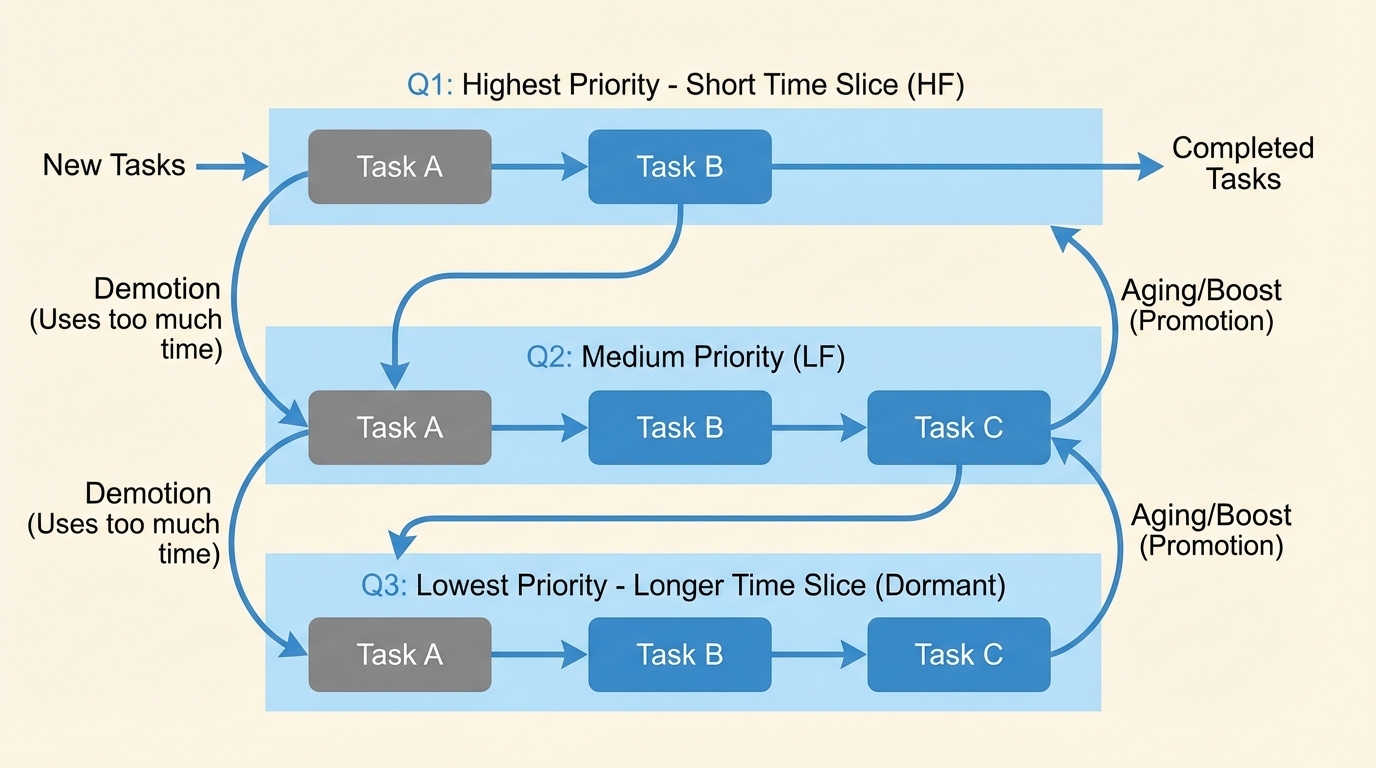
Multilevel Feedback Queues (MLFQ) (OSTEP): Operating systems use multiple priority queues with demotion/promotion rules and time quanta. Interactive jobs get quick response; batch jobs run when resources free. Multi-Clock Work adapts this: HF is the foreground queue with short quanta; Dormant is background with longer review slots.
Preemptive vs Non-Preemptive Scheduling: Trade responsiveness against flow integrity. Multi-Clock Work uses non-preemptive policy during HF bursts (no interrupts) but allows preemption for safety/client emergencies.
Priority Aging: Standard technique to prevent starvation in scheduling. Waiting jobs gain priority over time, ensuring indefinite deferral doesn’t occur. Multi-Clock Work’s age points directly implement this pattern.
Kanban + Little’s Law (Anderson, 2010): From lean manufacturing. WIP limits stabilize flow. Cycle Time = WIP ÷ Throughput is the governing equation. Little’s Law assumes stationarity but remains useful heuristically.
Theory of Constraints / Critical Chain (Goldratt): Identify the bottleneck, feed it first, and protect with buffers. In solo studios, the constraint is often the founder—feed that constraint daily.
Explore-Exploit Bandits (Gittins, 1979): From decision theory. Allocate effort to options with best expected future reward while reserving capacity for exploration via indices or ε-greedy strategies. The Bandit Score operationalizes this for creative work.
Timeboxing / Scrum Sprints (Scrum Guide, 2020): Fixed-length windows with goals; change only at boundaries. Reduces thrash and creates forcing functions.
Shape Up Cycles (Basecamp): Six-week build + two-week cool-down creates natural burst→incubation oscillation. Adapted for solo work as 2-3 week micro shape-ups.
Twenty Models Synthesized
The framework synthesizes 20 models from creativity research, cognitive science, scheduling theory, flow management, and product practice:
20 models
Wallas' Four Stages
Creativity cycles through preparation → incubation → illumination → verification
⚙ Mechanism
Stopping active work allows subconscious restructuring, insight, then deliberate checking.
✓ Benefits
- Humane rhythm; legitimizes stepping away
- Protects verification time
⚠ Constraints
- Descriptive; real projects interleave and loop
→ Studio Mapping
- Log stage per idea
- Schedule incubation windows and verification passes
- Pair with WIP caps so "incubation" ≠ neglect
Incubation Effect & Default Mode Network
Stepping away from a task boosts originality—especially for divergent work
⚙ Mechanism
Meta-analyses show positive incubation when you set a task aside and return; neuro work links internally directed thinking to DMN.
✓ Benefits
- Originality without extra effort time
⚠ Constraints
- Effect sizes vary by task, timing, and break activity
→ Studio Mapping
- Schedule 1-3-day gaps after deep seeding
- Re-expose (skim moodboard/notes), then produce variants
- Track intervals in MIR
Attention Residue
Unfinished Task A harms performance on Task B
⚙ Mechanism
Switching without closure leaves mental residue that degrades focus on the new task.
✓ Benefits
- Explains why "quick peeks" cost focus
⚠ Constraints
- Lab context; robust for knowledge work
→ Studio Mapping
- Finish-to-switch via micro-deliverable + restart note
- Ban mid-brushstroke jumps during HF bursts
Task-Switching Costs
Goal-shift and rule-activation delays; costs rise with complexity
⚙ Mechanism
Switching between tasks requires mental reconfiguration. Larger time slices and strong cues reduce penalty.
✓ Benefits
- Larger slices reduce total switching overhead
⚠ Constraints
- Unavoidable in multi-project studios
→ Studio Mapping
- Larger slices; fewer switches
- Standardize templates and checklists to lower re-activation
Dual-Process Theory
Fast System-1 vs slow System-2 thinking
⚙ Mechanism
Intuitive, automatic processing (S1) vs deliberate, analytical processing (S2). Different tasks suit different modes.
✓ Benefits
- Align task type to cognitive mode and energy peaks
⚠ Constraints
- Oversimplification of cognitive architecture
→ Studio Mapping
- AM fast sketch sweeps
- PM slow edit with checklists
- Gate S1→S2 via "cooling" pause
Ultradian Rhythms & Chronotype
~90-120-min energy cycles; morning/evening types
⚙ Mechanism
Natural fluctuations in alertness throughout the day. Chronotype determines peak performance windows.
✓ Benefits
- Match high-stakes work to personal energy peaks
⚠ Constraints
- Individual variation; requires self-tracking
→ Studio Mapping
- Two 90-min HF blocks at peaks
- Park admin in troughs
- Respect chronotype in small teams
Spaced Repetition
Expanding intervals consolidate memory
⚙ Mechanism
Reviewing material at increasing intervals (e.g., 1 day, 1 week, 1 month) strengthens long-term retention.
✓ Benefits
- Improves retention with less total review time
⚠ Constraints
- Requires discipline to maintain schedule
→ Studio Mapping
- Decks for techniques/swatches
- 7/30/90-day reviews for dormant ideas
Interleaving
Mix categories to improve discrimination
⚙ Mechanism
Switching between related concepts during learning improves ability to distinguish and apply them correctly.
✓ Benefits
- Better discrimination and transfer
⚠ Constraints
- Feels harder than blocked practice
→ Studio Mapping
- Interleave mini-studies
- Keep slices small to cap switch costs
MLFQ Scheduling
Priority queues with quanta; demotion/promotion; aging prevents starvation
⚙ Mechanism
Multiple queues with different time slices. New work starts in top queue; demotion if overrun; periodic boosts for aged items.
✓ Benefits
- Handles mix of bursty and long jobs
- Prevents indefinite delay of low-priority work
⚠ Constraints
- Tuning quanta and thresholds requires iteration
→ Studio Mapping
- HF foreground in top queue (short quanta)
- LF background in lower queues
- Periodic priority boosts for stuck work
Preemptive vs Non-Preemptive
Trade responsiveness vs flow integrity
⚙ Mechanism
Preemptive: can interrupt running task. Non-preemptive: task runs to completion or voluntary yield.
✓ Benefits
- Non-preemptive protects deep work
⚠ Constraints
- May delay urgent items
→ Studio Mapping
- Non-preemptive during HF bursts
- Allow preemption only for safety/clients
Priority Aging/Decay
Waiting items gain priority over time
⚙ Mechanism
Items accumulate "age points" daily. When threshold reached, auto-promote to higher priority tier.
✓ Benefits
- Prevents indefinite neglect
- Surfaces forgotten work
⚠ Constraints
- Requires tuning of aging rates and thresholds
→ Studio Mapping
- Age points daily
- Threshold auto-promotes (e.g., Dormant→LF at age 21)
Kanban + WIP + Little's Law
Limit WIP to stabilize cycle time
⚙ Mechanism
Cycle Time = WIP / Throughput. Reducing work-in-progress shortens average completion time.
✓ Benefits
- Predictable delivery
- Reveals bottlenecks
⚠ Constraints
- Requires measuring throughput
→ Studio Mapping
- Cap WIP per person and team
- If CT stretches, reduce WIP before adding capacity
Theory of Constraints / Critical Chain
Feed bottleneck; protect with buffers
⚙ Mechanism
Identify the constraint (bottleneck). Optimize flow through it. Use time buffers to absorb variation.
✓ Benefits
- Focus improvement efforts
- Protect critical path
⚠ Constraints
- Requires identifying constraint
→ Studio Mapping
- Identify your constraint (time, attention, tools)
- Feed it first daily
- Block interrupts
Timeboxing / Scrum Sprints
Fixed windows; change at boundaries
⚙ Mechanism
Commit to a fixed-duration work period (e.g., 1-2 weeks). No scope changes during sprint. Demo at end.
✓ Benefits
- Compresses learning cycles
- Forces prioritization
⚠ Constraints
- Rigidity can frustrate creative exploration
→ Studio Mapping
- 1-2-week art sprints with end demo
Design Sprint (5 days)
Map→Sketch→Decide→Prototype→Test in one week
⚙ Mechanism
Compressed innovation cycle: understand problem, diverge on solutions, converge on one, build prototype, test with users.
✓ Benefits
- Rapid validation
- Team alignment
⚠ Constraints
- Requires dedicated team for full week
→ Studio Mapping
- Use for collection concept or exhibition layout
Continuous Delivery / Small Batches
Shrink batch size; automate; ship often
⚙ Mechanism
Reduce work batch size and cycle time. Automate deployment. Increase feedback frequency.
✓ Benefits
- Faster feedback
- Lower risk per release
⚠ Constraints
- Requires automation infrastructure
→ Studio Mapping
- "Ship weekly": image set, BTS reel, or zine WIP PDF
Pomodoro Variants
25/5 or 50/10 focus blocks
⚙ Mechanism
Fixed work period + short break. Timer creates urgency and protects rest.
✓ Benefits
- Maintains energy
- Built-in micro-breaks
⚠ Constraints
- May interrupt flow state
→ Studio Mapping
- 50/10 for HF
- 25/5 for admin
Personal Kanban
Visualize work; limit WIP
⚙ Mechanism
Visual board with columns (To Do, Doing, Done). Explicit WIP limits per column.
✓ Benefits
- Visibility into workload
- Simple to start
⚠ Constraints
- Requires discipline to maintain
→ Studio Mapping
- Board lanes by clock (HF/LF/Dormant)
- Tickets carry age and next trigger date
Shape Up (6+2)
Six-week build + two-week cool-down
⚙ Mechanism
Fixed 6-week cycles for shaped work. 2-week cooldown for exploration, bugs, and planning next cycle.
✓ Benefits
- Protects exploration time
- Natural incubation window
⚠ Constraints
- Long cycle may not suit all contexts
→ Studio Mapping
- 2-3-week micro shape-ups + 3-4-day cool-down solo
Explore-Exploit / Gittins
Allocate time to options with best expected future reward while reserving exploration
⚙ Mechanism
Balance between exploiting known high-value options and exploring uncertain alternatives. Use index-based policies.
✓ Benefits
- Rational allocation under uncertainty
- Prevents premature convergence
⚠ Constraints
- Requires tracking per-idea signals
→ Studio Mapping
- Track per-idea signals
- Reserve 10-20% time for exploration unless exploitation score is high
Each model contributes mechanisms (how it works), constraints (when it fails), and studio-specific mappings (how to apply it). The synthesis creates a coherent system greater than any single model.
Part IV: Implementation
Getting Started
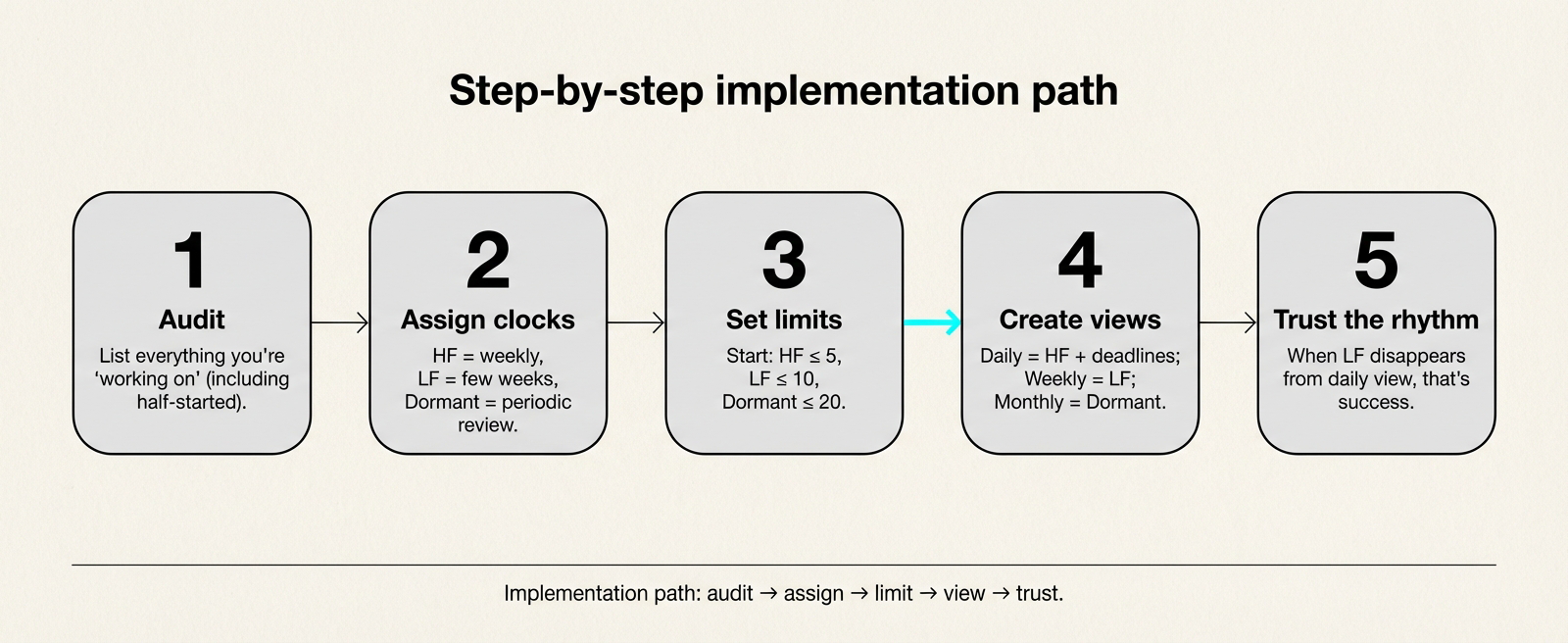
You don’t need sophisticated software. A notebook works. A simple database works. What matters is the structure:
-
Audit your current work. List everything you’re supposedly “working on.” Include the half-started things.
-
Assign clocks. For each item: Does this need attention multiple times per week (HF)? Every few weeks (LF)? Or just periodic review (Dormant)?
-
Set limits. Start with: HF ≤ 5, LF ≤ 10, Dormant ≤ 20. Adjust based on your reality.
-
Create clock-specific views. Your daily view shows only HF + imminent deadlines. Weekly review shows LF. Monthly shows Dormant.
-
Trust the rhythm. When an LF project disappears from daily view, that’s the system working, not failing.
Daily Workflow: HF Focus
Morning (10 min):
- Open HF view (sorted by Bandit Score descending)
- Pick highest-scoring item without blockers
- Check “Ready Next” field for immediate action
- Begin work in protected time block (60-90 min)
Throughout Day:
- Complete current HF burst before checking messages
- Use Pomodoro-style blocks (50/10 or 90/20)
- Update “Artifact Last” after each work session
- Update “Last Touched” to today
End of Day (5 min):
- Write restart note for any incomplete work
- Clear any HF items that reached Done
- Quick scan for aged items needing attention
Weekly Workflow: LF Refresh
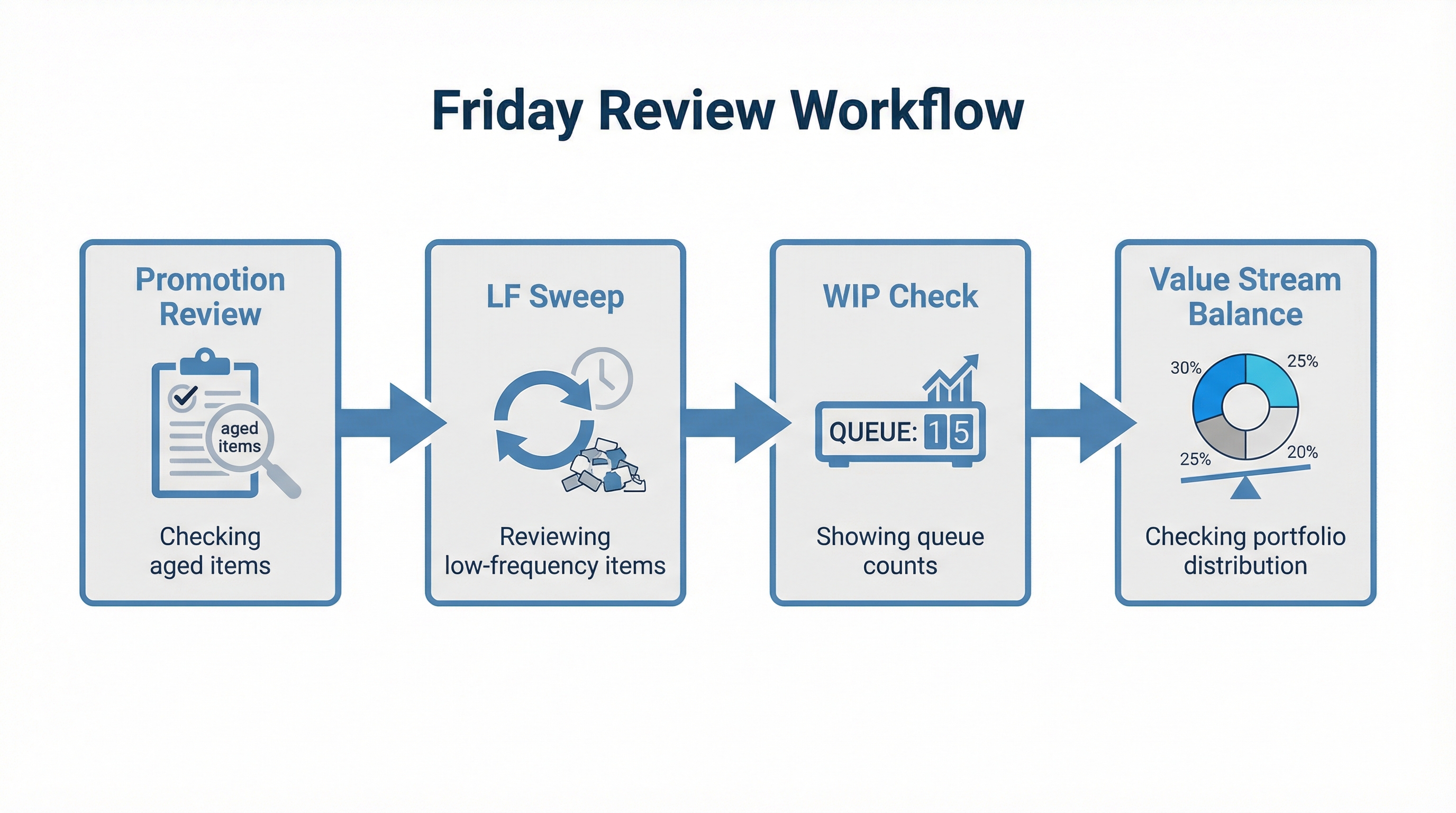
Friday Review (30-45 min):
-
Promotion Review: Check any items flagged by aging
- Promote to HF if ready for active work
- Kill/archive if no longer relevant
- Extend dormancy with explicit reason
-
LF Sweep: Review all LF items
- Update Bandit Scores with new information
- Identify 2-3 candidates for next week’s HF
-
WIP Check: Count items per clock
- HF count within limit?
- Total active work sustainable?
-
Value Stream Balance: Check portfolio distribution
- Any streams starved for attention?
- Any streams consuming disproportionate share?
Fortnightly: Dormant Review
Every Two Weeks (20-30 min):
-
Open Dormant view (sorted by Age Points descending)
-
For each item past aging threshold:
- Is there a new hypothesis to test?
- Any external signal justifying revival?
- If yes → promote to LF with clear next action
- If no → archive or extend dormancy another cycle
-
Quality check: Is anything truly dead? Archive it. Clear the noise.
Kill Criteria
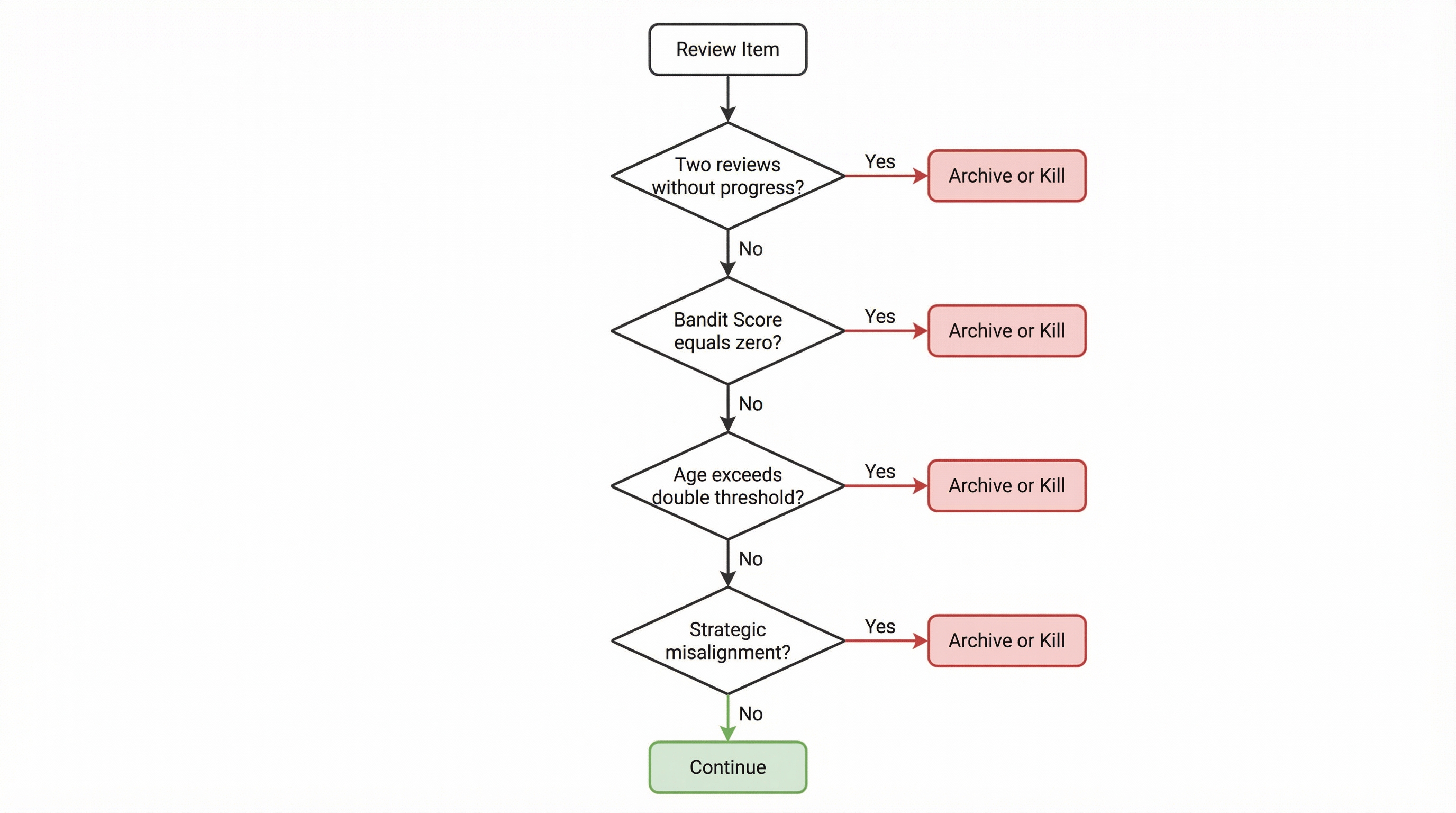
Not everything deserves indefinite attention. Kill or archive when:
- Two consecutive reviews without progress: No new Artifact Last, no updated Ready Next
- Bandit Score = 0: No revenue path, no portfolio value, no engagement
- Age Points > Threshold × 2: Item has aged twice as long as it should without action
- Strategic misalignment: Work no longer connects to current Value Streams
Killing isn’t failure—it’s governance. A healthy system has clear exits.
Part V: Case Study — 14-Week Pilot at NullProof Studio
Context
NullProof Studio operates two ventures:
- After-Image: Luxury automotive photography using the Anachrome Protocol
- NullProof R&D: Developing operational frameworks for creative studios
The founder (Andy) works with AI agents (Claude for PM/governance, ChatGPT for research) and one human collaborator (George, visual content). Goal: “enterprise capabilities without enterprise weight.”
Before Multi-Clock Work, task management relied on a Word document plus Google Calendar. Decisions about what to work on took 20-30 minutes of context reconstruction. Strategic work consistently lost to urgent client demands. Research projects aged indefinitely.
Implementation Evolution
Note: Tool and product names mentioned below are trademarks of their respective owners. References reflect our experience in a specific configuration; no affiliation or endorsement is implied.
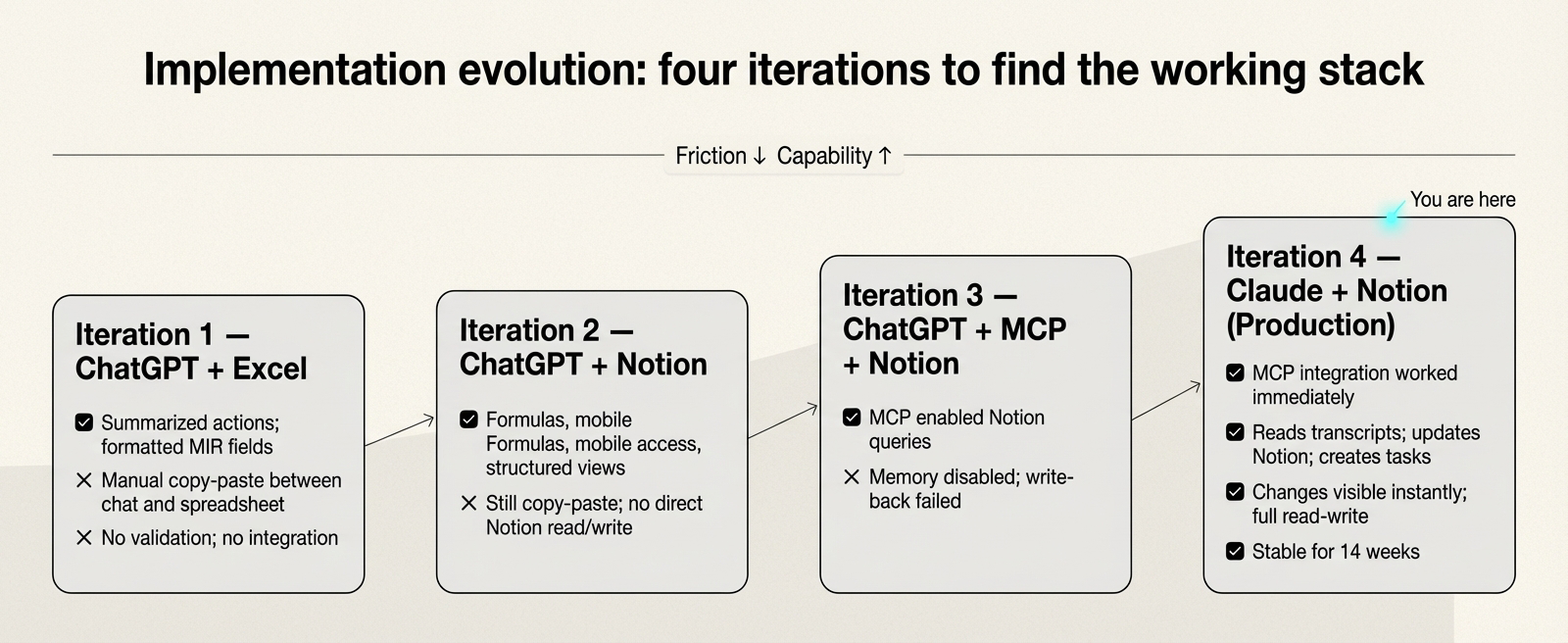
Iteration 1: ChatGPT + Excel
- ✅ ChatGPT summarized actions, formatted MIR fields from conversation
- ❌ Manual copy-paste between chat and spreadsheet
- ❌ No validation, no integration
Iteration 2: ChatGPT + Notion
- ✅ Notion provided built-in formulas, mobile access, structured views
- ❌ Still copy-paste; ChatGPT couldn’t read/write Notion directly
Iteration 3: ChatGPT + MCP + Notion
- ✅ MCP protocol enabled Notion queries
- ❌ Developer beta mode disabled memory; write-back failed
Iteration 4: Claude + Notion (Current System)
- ✅ MCP integration connected on first attempt in our setup
- ✅ Claude reads transcripts, updates Notion, creates tasks
- ✅ Changes visible instantly; full read-write capability
- ⚠️ No major issues observed in our use-case over 14 weeks (limitations noted below)
Quantitative Findings
Decision Latency:
- Before: Typically 20-30 minutes to decide “what should I work on?”
- After: Typically under 8 minutes (sort by Bandit Score, check Ready Next, begin)
- Observed improvement: ~65% reduction in our context
WIP Stability:
- HF queue stabilized at 5-6 items (within 3-6 limit)
- LF queue held at 10-12 items (within 8-12 limit)
- Dormant maintained at 15-18 items (well within 20 limit)
Starvation Prevention:
- No items lost to indefinite waiting during pilot period (starvation defined as past aging threshold without a promotion review decision)
- All aged items received promotion review as designed
- 8 items resurrected from Dormant during pilot
Cycle Time (HF Items):
- Mean: 4.2 days from Active to Done
- Median: 3 days
- Outliers (>14 days) flagged and addressed
Qualitative Findings
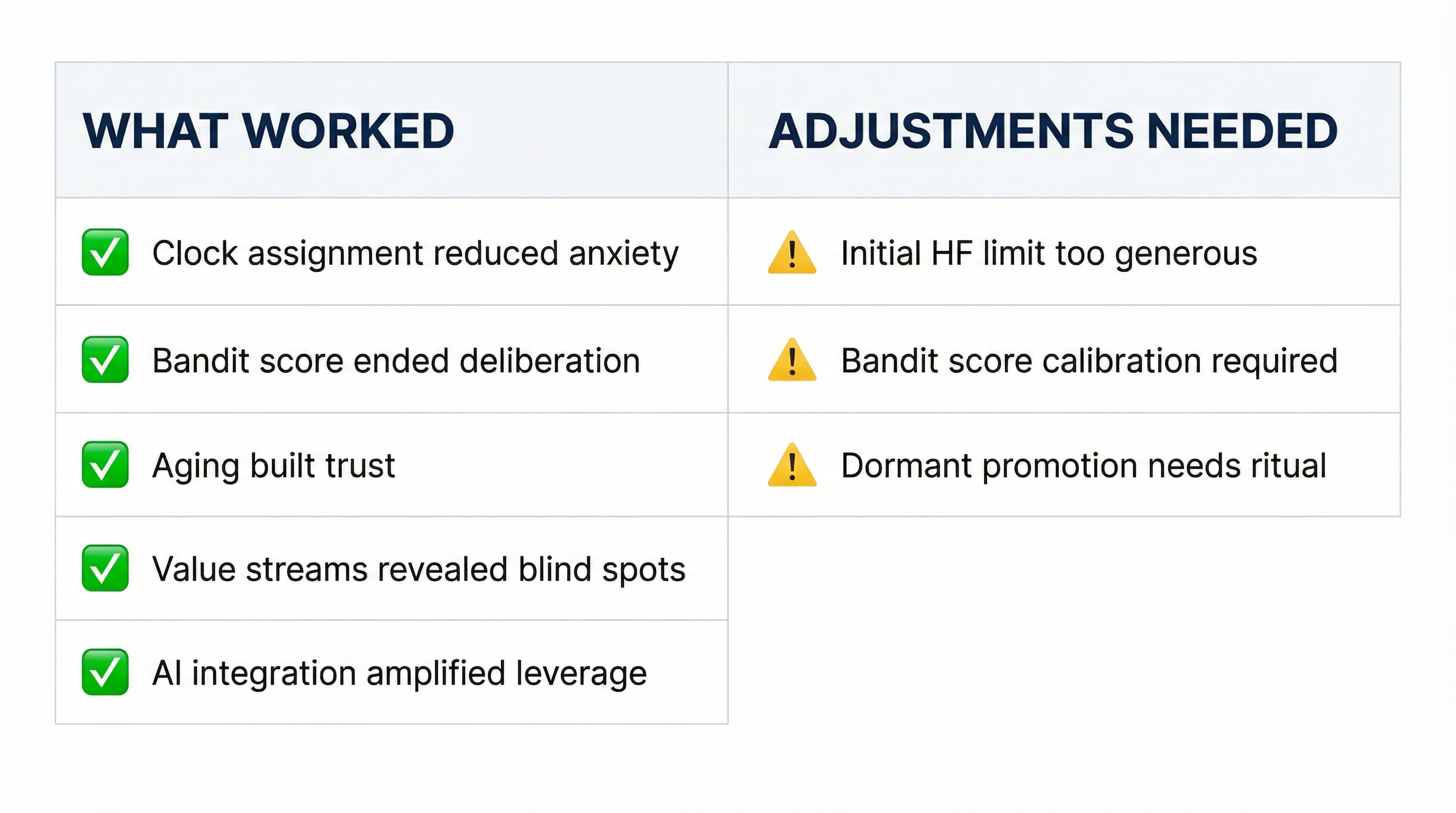
What Worked:
-
Clock assignment reduced anxiety. Knowing an LF item won’t appear in daily view—by design—eliminated guilt about not working on everything simultaneously.
-
Bandit Score ended circular deliberation. Instead of “which is more important?”, the system answered it. Work became execution, not decision-making.
-
Aging mechanism built trust. Nothing could hide indefinitely. The system was designed to surface items for review, which made stepping away from them psychologically safer.
-
Value Stream views revealed blind spots. R&D was consuming 60% of attention while Client work (revenue-generating) had only 15%. Rebalancing followed.
-
AI integration amplified leverage. Claude handling MIR operations, status updates, and weekly summaries freed human attention for strategic work.
What Needed Adjustment:
-
Initial HF limit too generous. Started with 8; thrashing returned. Reduced to 5-6 for sustainable flow.
-
Bandit Score required calibration. Early tendency to score everything high. Calibration question: “Is this really a 3, or am I inflating?”
-
Dormant-to-LF promotion needed ritual. Without explicit “why are we reviving this?” reasoning, zombie items returned. Added hypothesis requirement for resurrection.
The Meta-Finding
The whitepaper documenting Multi-Clock Work was itself managed using the MIR system. The framework to describe temporal governance was built using temporal governance.
This wasn’t planned—it emerged from necessity. The research project had multiple parallel threads (literature review, implementation, validation, writing) on different rhythms. Some weeks demanded intensive drafting (HF); others required stepping away to let ideas incubate (Dormant).
The whitepaper was self-fulfilling prophecy. We needed the framework to manage the R&D that produced the framework. Living the problem, designing the solution, building the tools, then using them to ship.
Part VI: Three Operating Models
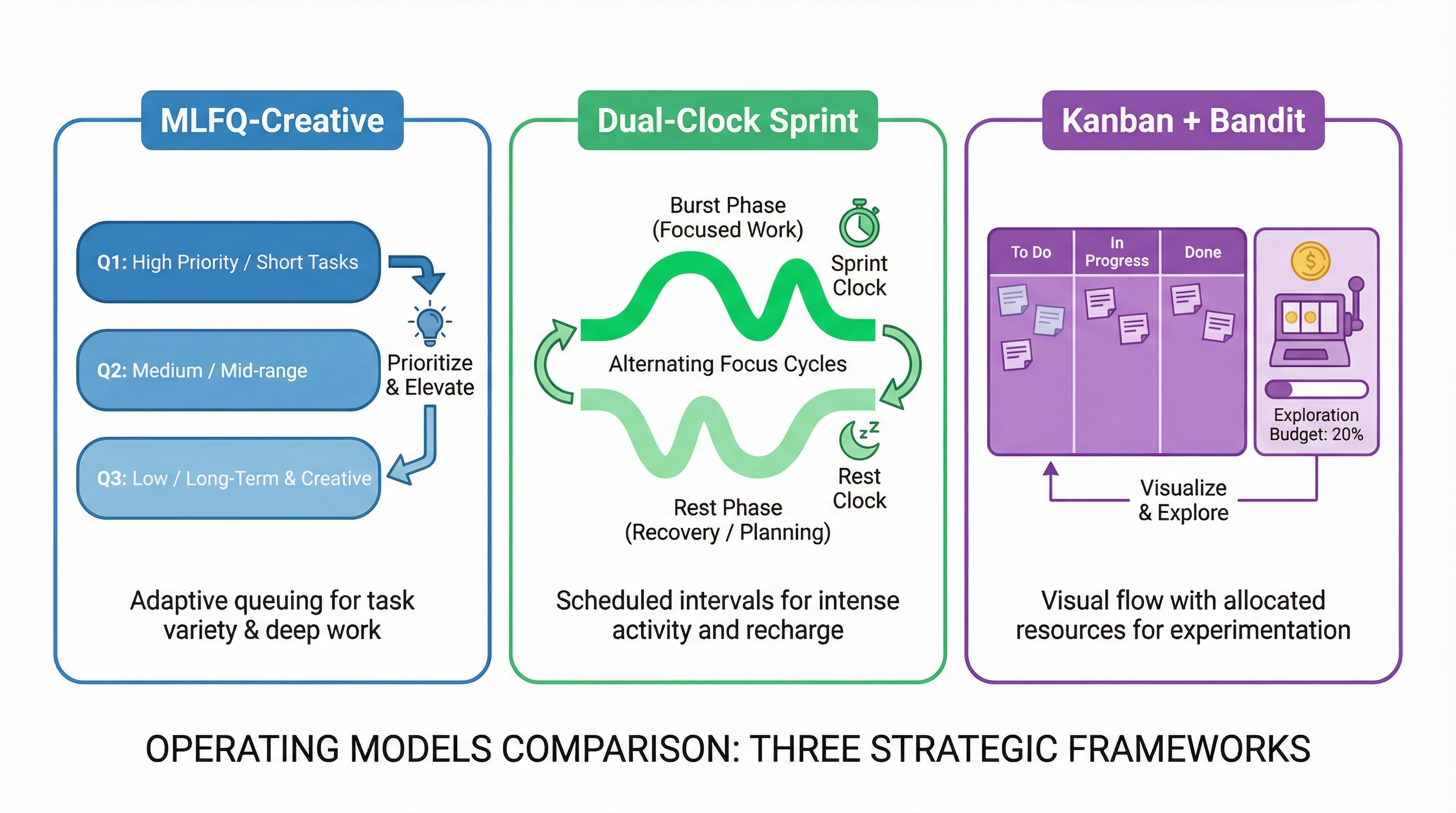
Multi-Clock Work can be implemented through three hybrid models, each emphasizing different aspects of the framework.
Model 1: MLFQ-Creative
Emphasis: Queue-based scheduling with explicit time quanta.
Structure:
- Q1 (HF): 60-90 minute work blocks
- Q2 (LF): 25-50 minute refresh blocks
- Q3 (Dormant): 10-20 minute review slots
Rules:
- New work starts in Q1
- If a task overruns 2 quanta without artifact, demote to Q2
- Items past aging threshold get priority boost to Q1 (“ship or kill”)
Best For: Studios with many parallel threads needing clear triage.
Model 2: Dual-Clock Sprint + Incubation
Emphasis: Alternating burst and incubation phases.
Structure:
- 1-2 week sprints with single Sprint Goal
- Two 90-minute HF blocks per day at chronotype peak
- Mid-sprint incubation afternoon
- 1-2 day post-sprint cool-down
Rules:
- Non-preemptive policy during HF blocks (no interrupts)
- LF/Dormant review only during incubation slots
- Sprint boundary is the only context-switch point
Best For: Makers who need protected creative time.
Model 3: Kanban + Bandit
Emphasis: Continuous flow with exploration budget.
Structure:
- Visual board with HF/LF/Dormant swimlanes
- Strict WIP limits per lane
- 10-15% time reserved for exploration
Rules:
- Pull highest Bandit Score unless exploration budget unused
- Weekly rebalance and score recalibration
- Promote/demote based on throughput data
Best For: Studios preferring continuous flow over fixed sprints.
Part VII: Integration and Extensions
Multi-Agent Orchestration
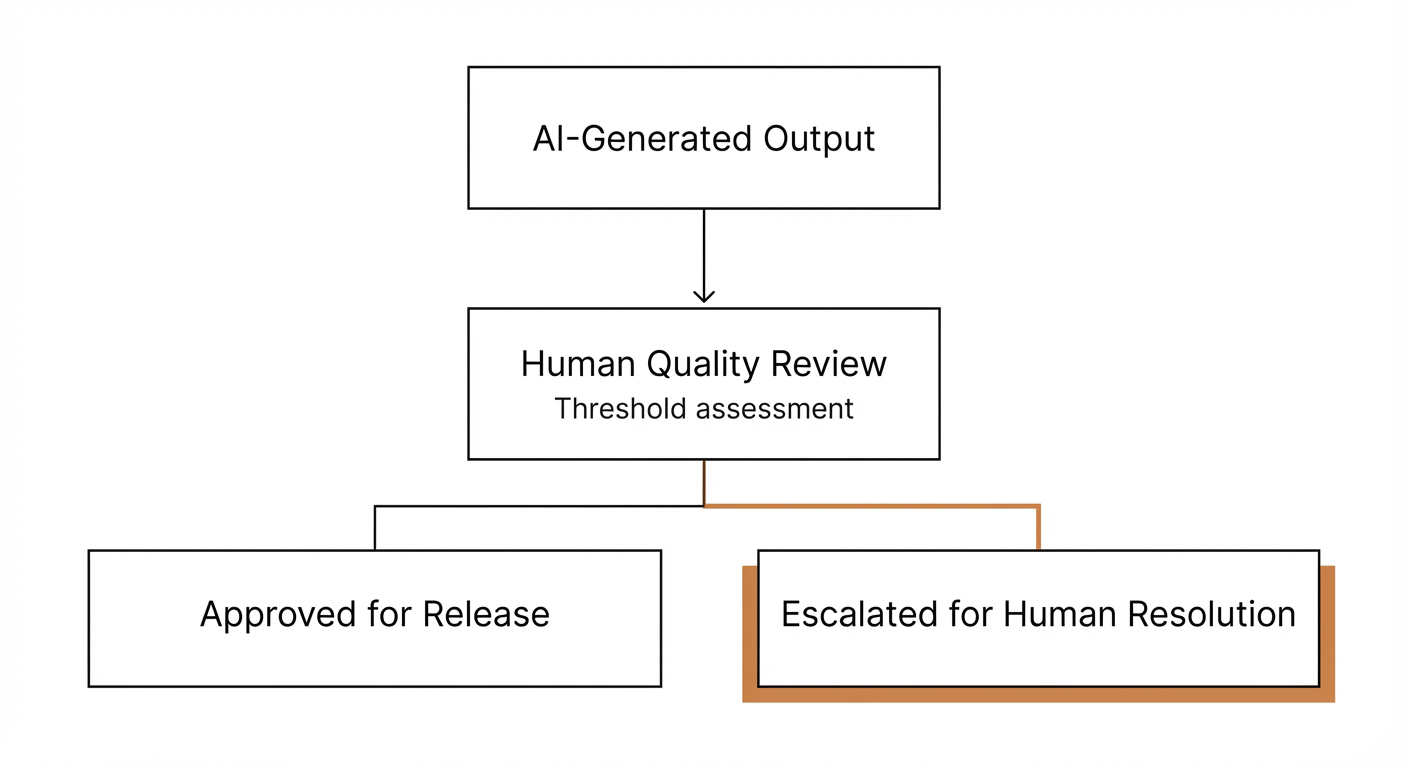
When AI agents handle operational tasks, Multi-Clock Work provides essential structure. “Propose candidates for promotion from LF to HF” is a query an agent can meaningfully answer. “Help me manage my projects” is not.
Agent Specialization Pattern:
- Claude (Sonnet): Synthesis, execution, MIR operations, routine tasks
- Claude (Opus): High-stakes decisions, novel problems, strategic work
- ChatGPT: Deep research, framework analysis, cross-domain synthesis
- Human: Strategy, taste, filtering, final approvals
The Orchestrator’s Advantage:
Multiple AI agents + Human filter + Shared coordination layer =
    Enterprise capabilities without enterprise bloat
The value-adding test applies as a heuristic: “If it’s not adding value—don’t do it.” This filter prevents AI agents from proposing enterprise theater while extracting genuine leverage.
Campaign Framework Connection
For marketing and content operations, Multi-Clock Work extends to a three-tier campaign system:
- Tier 1: Campaigns (4-12 weeks): Strategic objectives, success metrics, narrative arc
- Tier 2: Content Briefs (weekly): Core message, target platforms, production requirements
- Tier 3: Production Outputs (per-platform): Specific deliverables, owners, publish dates
This enables coherent multi-platform publishing where one anchor piece (essay, video) generates platform adaptations (LinkedIn post, Bluesky thread, Instagram carousel) with tracked resource allocation.
See the dedicated Campaign Framework codex entry for full implementation details.
Success Criteria Integration
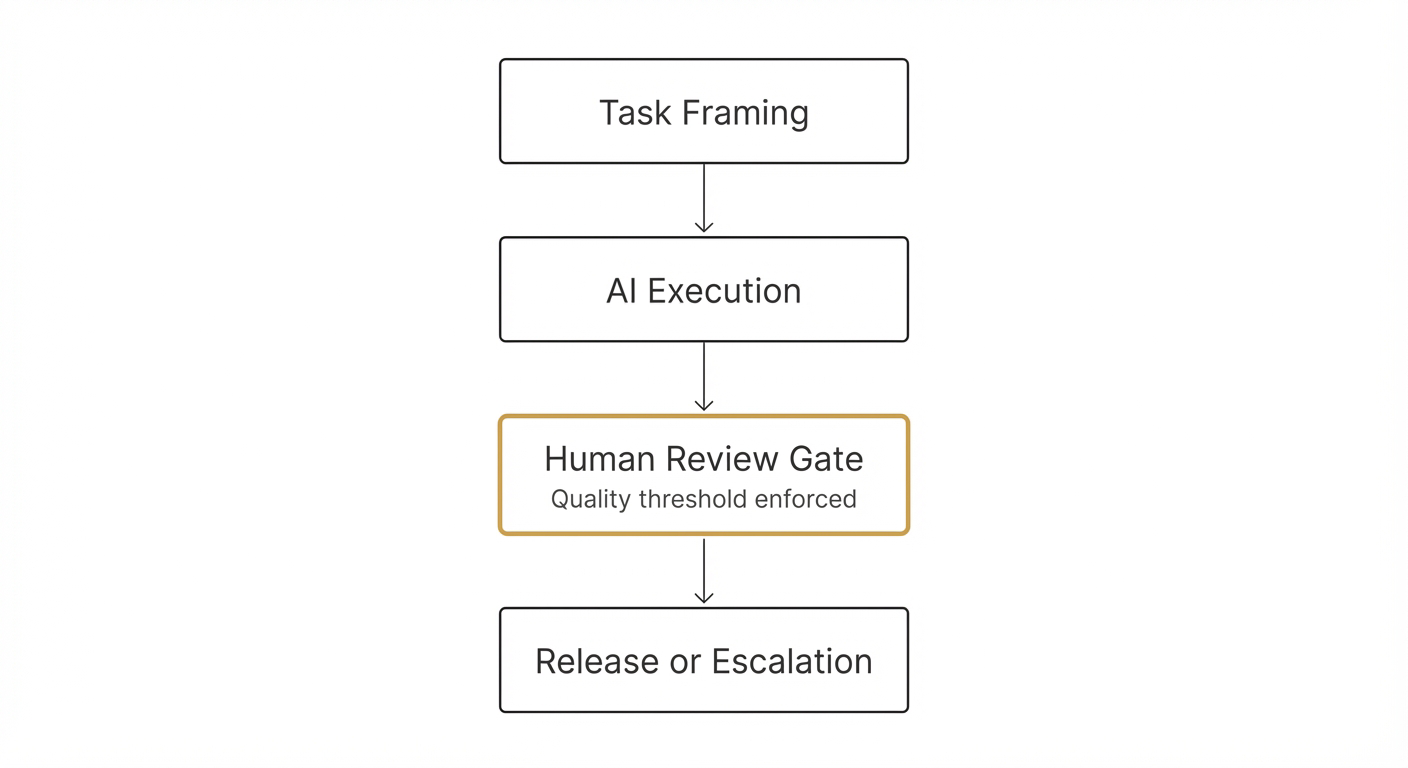
Every task benefits from explicit closure criteria. The three-gate pattern:
- Specification Gate: Define “done” before starting (Agent Brief)
- Verification Gate: Prove completion with evidence (Closure Record)
- Learning Gate: Extract insights for next time (Kaizen notes)
This prevents “90% done” syndrome and enables retrospective Bandit Score calibration.
Conclusion: Temporal Governance as Creative Infrastructure
Multi-Clock Work isn’t a productivity system. It’s a governance architecture that treats creative work as what it actually is: multiple parallel processes running on different timescales, requiring different types of attention, deserving different kinds of respect.
Core Principles:
- Match rhythm to work type. Not all work wants the same clock.
- Protect deep bursts. Context-switching is expensive; use finish-to-switch.
- Prevent starvation. Aging mechanisms guarantee review.
- Balance exploitation and exploration. Bandit Scores with exploration budget.
- Make WIP visible. Limits create flow; overflow creates thrash.
- Trust the system. When LF items leave daily view, that’s governance working.
The calendar will still lie to you. But with Multi-Clock Work, you’ll have a better map.

Appendix A: Quick Reference
Heuristics Checklist
- Set WIP caps: HF 3-6/person, LF 8-12, Dormant 15-20
- Use finish-to-switch: artifact checkpoint + restart note
- Time blocks: HF 60-90m, LF 25-50m, Dormant review 10-20m
- Aging rates: Dormant +1/day, LF +0.5/day, HF +0.1/day
- Aging thresholds: Dormant 21, LF 10, HF 5
- Explore budget: 10-20% of time unless clear hit in hand
- Constraint first: feed your bottleneck daily
Sample Weekly Cadence (Solo)
| Day | AM | PM |
|---|---|---|
| Monday | HF 90-min burst | HF 90-min burst |
| Tuesday | HF 90-min burst | LF refresh block |
| Wednesday | HF 90-min burst | Design sprint micro-test |
| Thursday | HF 90-min burst | LF refresh block |
| Friday | Kanban review + aging | Ship something small |
Anti-Patterns
| Pattern | Symptom | Fix |
|---|---|---|
| Incubation = neglect | Dormant items never reviewed | Spaced dates + aging promotions |
| WIP inflation | Cycle time spikes | Enforce caps before adding |
| Preemption creep | Constant interrupts | Declare non-preemptive windows |
| Reward overfitting | Only familiar work advances | Maintain 10-20% exploration budget |
| Score inflation | Everything is high priority | Calibrate against comparisons |
Appendix B: Research References
Cognitive Science:
- Sio, U.N. & Ormerod, T.C. (2009). Does incubation enhance problem solving? A meta-analytic review. Psychological Bulletin, 135(1), 94-120.
- Leroy, S. (2009). Why is it so hard to do my work? The challenge of attention residue when switching between work tasks. Organizational Behavior and Human Decision Processes, 109(2), 168-181.
- Rubinstein, J.S., Meyer, D.E. & Evans, J.E. (2001). Executive control of cognitive processes in task switching. Journal of Experimental Psychology: Human Perception and Performance, 27(4), 763-797.
- Roenneberg, T., Pilz, L.K., Zerbini, G. & Winnebeck, E.C. (2019). Chronotype and Social Jetlag: A (Self-) Critical Review. Biology, 8(3), 54.
- Cepeda, N.J., Pashler, H., Vul, E., Wixted, J.T. & Rohrer, D. (2006). Distributed practice in verbal recall tasks: A review and quantitative synthesis. Psychological Bulletin, 132(3), 354-380.
- Rohrer, D. & Taylor, K. (2007). The shuffling of mathematics problems improves learning. Instructional Science, 35, 481-498.
- Raichle, M.E. et al. (2001). A default mode of brain function. Proceedings of the National Academy of Sciences, 98(2), 676-682.
- Kahneman, D. (2011). Thinking, Fast and Slow. Farrar, Straus and Giroux.
Operations Research:
- Arpaci-Dusseau, R.H. & Arpaci-Dusseau, A.C. Operating Systems: Three Easy Pieces (OSTEP) - Multilevel Feedback Queues.
- Gittins, J.C. (1979). Bandit Processes and Dynamic Allocation Indices. Journal of the Royal Statistical Society: Series B, 41(2), 148-164.
- Little, J.D.C. (1961). A Proof for the Queuing Formula: L = λW. Operations Research, 9(3), 383-387. See also: Little’s Law for Professional Scrum with Kanban.
- Goldratt, E.M. (1984). The Goal: A Process of Ongoing Improvement. North River Press. See also: Theory of Constraints Institute.
- Anderson, D.J. (2010). Kanban: Successful Evolutionary Change for Your Technology Business. Blue Hole Press.
Product Practice:
- Schwaber, K. & Sutherland, J. (2020). The Scrum Guide.
- Singer, R. (2019). Shape Up: Stop Running in Circles and Ship Work that Matters. Basecamp.
- Humble, J. & Farley, D. (2010). Continuous Delivery. Addison-Wesley. See also: Continuous Delivery Principles.
- Knapp, J., Zeratsky, J. & Kowitz, B. (2016). Sprint: How to Solve Big Problems and Test New Ideas in Just Five Days. Simon & Schuster.
- Benson, J. & Barry, T.D. (2011). Personal Kanban: Mapping Work | Navigating Life. Modus Cooperandi Press.
Appendix C: Twenty Model Capsules
The framework synthesizes 20 models from creativity research, cognitive science, scheduling theory, flow management, and product practice. Each model contributes mechanisms (how it works), constraints (when it fails), and studio-specific mappings (how to apply it).
Creativity & Cognitive Science
1. Wallas’ Four Stages (1926)
Creativity cycles through preparation → incubation → illumination → verification. Stopping active work allows subconscious restructuring, then a burst of insight, followed by deliberate checking.
Benefits: Gives a humane rhythm; legitimizes stepping away and protects verification time. Constraints: Descriptive; real projects interleave stages and loop. Studio mapping: Use as meta-scaffold: log each idea’s stage; schedule explicit incubation windows and verification passes. Pair with WIP limits so “incubation” doesn’t become neglect.
2. Incubation Effect & Default Mode Network
Meta-analyses show a positive incubation effect—especially for divergent tasks—when you set a task aside and return later; neuro work links internally directed thinking to the DMN.
Benefits: Improves originality without extra “effort time”; frees you to progress elsewhere. Constraints: Effect sizes depend on task, timing, and what you do during the break. Studio mapping: For concept art or writing, schedule 1-3 day gaps after deep seeding; on return, use a short re-exposure ritual (skim moodboard/notes), then produce variants. Track incubation intervals in MIR.
3. Attention Residue (Leroy, 2009)
When you leave Task A unfinished, cognition “sticks,” reducing performance on Task B.
Benefits: Explains why “quick peeks” are costly. Constraints: Lab settings; still robust signal for knowledge work. Studio mapping: Adopt finish-to-switch: end with a micro-deliverable (thumbnail, commit, export), write a “restart note,” then switch. Ban mid-brushstroke context jumps during HF bursts.
4. Task-Switching Costs (Rubinstein, Meyer, Evans)
Goal-shift and rule-activation stages create additive time penalties; costs rise with rule complexity and fall with good cues.
Benefits: Justifies bigger slices and strong cues. Constraints: Not all tasks equal; habituation helps. Studio mapping: Standardize scene/project templates and checklists to lower rule-activation time when you must switch.
5. Dual-Process Theory (Kahneman)
Fast, intuitive System 1 vs slow, deliberate System 2.
Benefits: Match work to energy/attention: ideation sketches (S1) vs edit/curation (S2). Constraints: Oversimplifies; still a powerful lens. Studio mapping: Block AM “fast” sketch sweeps; PM “slow” edit sessions with checklists to nudge S2. Gate S1-to-S2 handoff via “cooling” pause.
6. Ultradian Rhythms & Chronotype
People show ~90-120 minute alertness cycles and stable morning/evening preferences; align demanding bursts to personal peaks.
Benefits: Natural slots for HF bursts; embed short recovery. Constraints: Evidence for BRAC in cognitive performance is mixed; treat as heuristic. Studio mapping: Two 90-min HF blocks at your daily peaks; reserve admin for troughs. Respect evening vs morning types in small studios.
7. Spaced Repetition
Expanding intervals consolidate memory; retention spikes vs massed practice.
Benefits: Perfect for low-frequency refresh of techniques, color theory, scripts. Constraints: Best for declarative/procedural memory, less for creating new art. Studio mapping: Keep swatch libraries/composition prompts in Anki-style decks; schedule 7/30/90-day reviews for dormant ideas to prevent total decay.
8. Interleaving
Mix categories so your brain learns to choose the right strategy.
Benefits: Better long-term discrimination than blocking. Constraints: Feels worse short-term. Studio mapping: Interleave mini-studies (portrait, architecture, macro) in one session to improve stylistic selection; keep slices small to cap switching costs.
Scheduling & Flow
9. Multilevel Feedback Queues (MLFQ)
Multiple priority queues with time quanta; CPU-intensive jobs get demoted; I/O/interactive get promoted; aging prevents starvation.
Benefits: Naturally separates bursty foreground from long background tasks. Constraints: Requires tuning quanta/boost intervals. Studio mapping: Map HF foreground to top queue with short time-slices; LF background to lower queues with longer slices; apply periodic “priority boosts” to stuck work.
10. Preemptive vs Non-Preemptive Scheduling
Interruptible vs run-to-completion time slots.
Benefits: Preemption keeps responsiveness; non-preemptive preserves flow. Constraints: Preemption overhead can fragment focus. Studio mapping: Use non-preemptive policy during HF flow (no interrupts); allow preemptive “page” rules only for safety/clients.
11. Priority Aging / Decay
Waiting items gain priority over time to avoid starvation.
Benefits: Ensures LF/Dormant threads eventually get a look. Constraints: If too aggressive, steals time from HF. Studio mapping: Add “age points” daily; on review, any idea above threshold bubbles to the next workable slot.
12. Kanban + WIP Limits + Little’s Law
Limit WIP to stabilize flow: CT = WIP / TH.
Benefits: Predictable cycle time; forces finishing. Constraints: Little’s Law assumes stable system averages; still useful heuristically. Studio mapping: Cap studio WIP (e.g., 5 active threads/person). If CT stretches, reduce WIP before adding capacity.
13. Theory of Constraints / Critical Chain
Identify the bottleneck, feed it, and protect with buffers.
Benefits: Maximizes throughput where it matters. Constraints: Best for projectized work; identify the real constraint (often you). Studio mapping: If editing/mastering is your constraint, feed it first each day; keep a time buffer for that stage; block interrupts.
Product & Maker Practice
14. Timeboxing / Scrum Sprints
Fixed-length windows with a goal; change only at boundaries.
Benefits: Reduces thrash; creates forcing functions. Constraints: Can feel rigid solo; adjust length. Studio mapping: 1-2 week “art sprints” with demo/artifact at end; backlog is your Idea Register.
15. Design Sprint (5 days)
Map→Sketch→Decide→Prototype→Test—compress months of learning into one week.
Benefits: Fast external validation. Constraints: Intense; best for concept/market questions. Studio mapping: Use for a collection concept, exhibition layout, or productized print drop.
16. Continuous Delivery / Small Batches
Shrink batch size; automate; ship often.
Benefits: Frequent feedback; lower risk. Constraints: Pipeline overhead. Studio mapping: “Ship something weekly”: a processed image set, a BTS reel, or a zine WIP PDF.
17. Pomodoro Variants
25/5 (or custom) focus blocks + breaks.
Benefits: Simple guardrail against drift; natural “stop notes.” Constraints: 25 min may be too short for flow; extend to 50/10 or 90/15. Studio mapping: Use 50/10 for HF; 25/5 for admin.
18. Personal Kanban
Visualize work + limit WIP.
Benefits: Flexible, solo-friendly. Constraints: Requires discipline in WIP caps. Studio mapping: Board columns by clock (HF/LF/Dormant) not just status; tickets carry “age” and “next trigger date.”
19. Shape Up Cycles (6+2)
Six-week focused build + two-week cool-down.
Benefits: Natural burst→incubation oscillation. Constraints: Team-oriented; adapt cycle length. Studio mapping: Solo: 2-3 week “micro shape-ups” + 3-4 day cool-down for admin/archival.
Decision Theory
20. Explore-Exploit / Gittins Index
Allocate tries to best option while exploring via indices/ε-greedy.
Benefits: Rationalizes when to try new vs double-down. Constraints: Needs rough reward signals. Studio mapping: Track per-idea signals (engagement, buyer interest, self-rating); reserve 10-20% time for exploration unless exploitation score is high.
Andy is the founder of NullProof Studio, building systems for disciplined creativity. Multi-Clock Work emerged from the intersection of AI operations, creative studio practice, and temporal governance research.
For implementation support, see the MIR Database Schema Reference and Bandit Scoring Guide.
Document Version: 2.1
Last Updated: 2025-01-05
Status: Publication Ready