Peer Agent Collaboration Framework
A multi-agent architecture where AI agents collaborate as peers in shared context, with authorization encoded in tools rather than routing logic. Replaces orchestrator bottlenecks with emergent coordination.

The Peer Agent Collaboration Framework replaces centralized orchestration with emergent coordination. Instead of one agent routing work to others, all agents observe shared context and self-select based on domain expertise. Authorization moves from routing logic to tool implementation. The human participates as a peer with reserved authority, not as a manager of managers.
This framework emerged from production use at NullProof Studio, where multiple AI agents (Claude as “Michelle” for governance, GPT-4 as “George” for creative work) collaborate on creative and operational tasks without a central coordinator.
Core Architecture
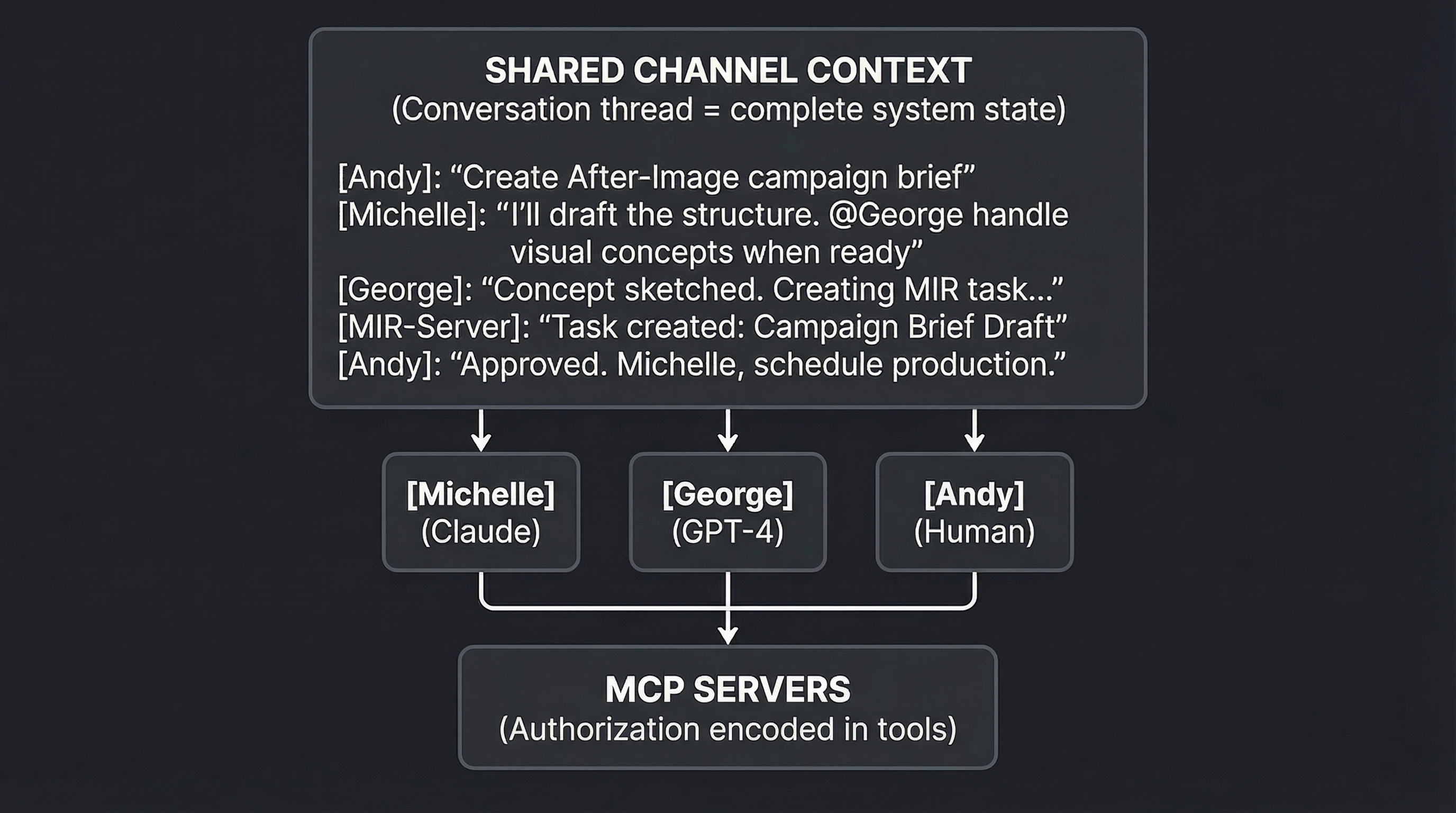
Three principles distinguish this from orchestrator patterns:
-
Shared context, not routed messages. All agents read the same conversation. Context doesn’t flow through a coordinator—it’s simultaneously available to everyone.
-
Tool-encoded authorization, not routing logic. What each agent can do is determined by tool implementation, not by an orchestrator’s routing decisions.
-
Self-selection, not assignment. Agents choose to act based on their domain expertise and the conversation state, not because a coordinator told them to.
Component 1: The Shared Channel
The shared channel is the foundational component—a persistent conversation that serves as the single source of truth for system state.
Requirements
Persistent and append-only. Messages are never deleted. Every agent action, human input, and tool result becomes part of the permanent record. This creates an audit trail and enables replay.
Universally readable. All agents can read the complete channel history. No agent has privileged access; no agent is excluded from context.
Structured messages. Each message carries metadata beyond content:
interface ChannelMessage {
  id: string;
  timestamp: string;
  sender: "andy" | "michelle" | "george" | "system";
  content: string;
  mentions?: string[];        // ["@george", "@michelle"]
  toolCalls?: ToolCallLog[];  // What tools were invoked
  threadRef?: string;         // For nested conversations
}

interface ToolCallLog {
  tool: string;               // "mir.createTask"
  params: object;
  result: "success" | "pending_approval" | "rejected";
  approvalRequired?: string;  // "andy"
  approvedBy?: string;
  approvedAt?: string;
}
Real-time broadcast. When any participant posts, all others receive the message immediately. Agents don’t poll; they subscribe.
Implementation Options
| Technology | Characteristics | Best For |
|---|---|---|
| Socket.IO | Simple, real-time bidirectional | Prototypes, small teams |
| NATS | Lightweight message broker | Multi-agent at scale |
| Ably/Pusher | Managed service, scales easily | Production without infrastructure |
| Phoenix Channels | Elixir, battle-tested for chat | High-reliability requirements |
The specific technology matters less than the properties: persistent, append-only, universally readable, real-time.
Component 2: Tool-Encoded Authorization
In orchestrator architectures, a central agent decides what other agents can do. In peer architecture, the tools themselves encode authorization. Any agent can attempt any action; the tool determines what succeeds.
The MCP Pattern
Model Context Protocol (MCP) servers expose domain operations as tools. Each tool implements its own authorization logic:
@server.tool()
async def create_task(
    name: str,
    domain: Literal["After-Image", "Nullproof", "R&D"],
    clock: Literal["HF", "LF", "Dormant"],
    owner: Literal["Andy", "Michelle", "George"],
    caller_agent: str,
) -> dict:
    """
    Create a new MIR task.

    Authorization rules encoded in tool:
    - George can create After-Image tasks (auto-approved)
    - Michelle can create any task (auto-approved)
    - Other agents need Andy approval for HF tasks
    """

    # Rule 1: Domain ownership = auto-approve
    if (domain == "After-Image" and caller_agent == "george") or \
       (caller_agent == "michelle"):
        task = await create_notion_page(...)
        await channel.broadcast({
            "sender": "system",
            "content": f"Task {task.id} created by {caller_agent}",
            "toolCalls": [{"tool": "mir.createTask", "result": "success"}]
        })
        return {"success": True, "task_id": task.id}

    # Rule 2: Require approval for cross-domain or HF
    if clock == "HF" or domain != agent_domains[caller_agent]:
        await channel.broadcast({
            "sender": "system",
            "content": f"{caller_agent} requests approval to create HF task '{name}'. @andy approve?",
            "toolCalls": [{
                "tool": "mir.createTask",
                "result": "pending_approval",
                "approvalRequired": "andy"
            }]
        })
        return {"success": False, "pending_approval": True}
Authorization Tiers
Map governance protocols directly to tool behavior:
| Tier | Authorization | Tool Behavior |
|---|---|---|
| Tier 1: Full Autonomy | No approval needed | Tool executes immediately, broadcasts result |
| Tier 2: Guided Autonomy | Pattern-based or human approval | Tool checks patterns; if uncertain, requests approval |
| Tier 3: Human Authority | Always requires human | Tool creates pending request, waits for approval |
| Tier 4: Human Only | Tool refuses | Tool returns error explaining why |
Approval Flow
When a tool requires approval:
- Tool broadcasts request to shared channel with
pending_approvalstatus - Human sees request in channel alongside all other activity
- Human responds with approval or rejection
- Tool monitors channel for approval message
- Tool completes or rejects based on human response, broadcasts result
[George]: Creating campaign brief task...
[MIR-Server]: ⏸️ George requests approval to create HF task
              "Campaign Brief: Q1 Launch". @andy approve?
[Andy]: Approved
[MIR-Server]: ✅ Task MIR-2025-047 created. Owner: George, Clock: HF
The approval happens in the same channel where all other work happens. No separate approval queue, no context switch.
Component 3: Domain Self-Selection
Without an orchestrator assigning tasks, how do agents know when to act? Through domain self-selection: agents monitor the shared channel and contribute when their expertise is relevant.
Agent Domains
Each agent has defined expertise areas:
| Agent | Primary Domain | Secondary | Capabilities |
|---|---|---|---|
| Michelle | Governance, Operations | Strategy, Process | MIR management, scheduling, compliance |
| George | Creative, Visual | Brand, Content | Design, photography, visual concepts |
| Andy | Strategy, Approval | All domains | Final authority, business decisions |
Selection Triggers
Agents monitor the channel for signals that their expertise is needed:
Explicit mentions. @george directly invokes George. This is the clearest signal.
Domain keywords. “Design the visual concept” triggers George even without explicit mention. “Update the MIR” triggers Michelle.
Handoff patterns. “When the brief is ready, George can start visuals” creates a conditional trigger. George monitors for brief completion.
Gap detection. If a request sits unanswered and matches an agent’s domain, that agent can volunteer.
Selection Protocol
When an agent detects a potential trigger:
- Assess fit. Does this match my domain expertise? Am I the best agent for this?
- Check for conflicts. Is another agent already handling this? Was someone else mentioned?
- Announce intent. “I’ll handle the visual concepts” before starting work.
- Execute. Complete the work, use relevant tools.
- Report. Broadcast results to the channel.
[Andy]: We need a campaign brief for the Q1 launch.
[Michelle]: I'll draft the structure and success criteria.
           @George, visual concepts once I have the brief skeleton.
[Michelle]: Brief structure complete. Core message: "Proof through
           absence." Target: supercar collectors.
           George, ready for visual direction.
[George]: On it. Exploring destroyed film aesthetic for hero image.
No orchestrator assigned these tasks. Each agent recognized their domain and announced their contribution.
Component 4: Human Integration
The human isn’t a manager of agents or an approval bottleneck. The human is a participant in the shared channel with certain reserved authorities.
Human Capabilities
Full visibility. The human sees everything agents see—the complete channel history, all tool calls, all decisions.
Intervention at any point. The human can redirect, correct, or override at any moment, not just at predefined checkpoints.
Reserved decisions. Certain actions always require human approval (Tier 3 governance). These are encoded in tools, not in agent behavior.
Strategic direction. The human sets goals and constraints; agents execute within those boundaries.
Avoiding Human Bottleneck
The risk: if everything requires human approval, the human becomes the new orchestrator.
The solution: tiered authorization. Most routine work (Tier 1, Tier 2) proceeds without human involvement. The human only sees what requires their attention:
- Tier 3 approval requests
- Conflict escalations
- Strategic decisions
- Anomaly flags
The channel might contain 50 messages of agent collaboration. The human scans for items tagged for their attention, reviews those, and lets the rest flow.
Presence Modes
Human availability affects system behavior:
| Mode | Human Behavior | System Behavior |
|---|---|---|
| Active | Participating in channel | Agents proceed normally, approvals fast |
| Monitoring | Reading but not responding | Agents queue Tier 3 items, continue Tier 1-2 |
| Away | Not available | Agents work within autonomous boundaries only |
Agents can detect presence through activity patterns and adjust their behavior—queueing approval requests when the human is away rather than blocking on them.
Component 5: Conflict Resolution
Without an orchestrator to arbitrate, how are conflicts resolved?
Conflict Types
Domain overlap. Both Michelle and George could handle a task. Who takes it?
Disagreement. Michelle’s governance perspective conflicts with George’s creative direction.
Resource contention. Two agents want to modify the same item simultaneously.
Resolution Patterns
Explicit domains win. If a task clearly falls in one agent’s domain, that agent has priority. “Visual design” is George’s domain even if Michelle could theoretically contribute.
First claim wins. If an agent announces “I’ll handle this” and no one objects, they own it. Speak up or defer.
Escalate to human. Genuine disagreements that agents can’t resolve go to the human. The channel makes escalation natural: “Andy, Michelle and I see this differently. She wants X, I think Y. Your call?”
Tool-level locking. For resource contention, tools can implement locks. If George is editing a task, Michelle’s edit attempt returns “currently locked by George.”
Anti-Patterns
Circular escalation. Agent A defers to Agent B, who defers back to A. Prevent by requiring one agent to claim ownership or explicitly escalate to human.
Overclaiming. An agent claims tasks outside their domain. Prevent through clear domain definitions and peer pushback.
Under-claiming. Tasks sit unclaimed because each agent assumes another will take it. Prevent through gap detection: if a domain-matched task sits for N seconds, the relevant agent should claim or escalate.
Implementation Roadmap
Phase 1: Foundation (Week 1-2)
Build the shared channel.
- Choose technology (Socket.IO for prototyping)
- Implement message schema with tool call logging
- Create simple web UI for human participation
- Test with two agents reading/writing
Create first MCP server.
- Start with MIR operations (create, update, complete tasks)
- Implement Tier 1 (auto-approve) and Tier 3 (human approval) flows
- Test approval flow end-to-end
Phase 2: Multi-Agent (Week 3-4)
Add second agent.
- Define distinct domains for each agent
- Implement self-selection triggers
- Test handoff patterns between agents
Refine authorization.
- Implement Tier 2 (pattern-based) approval
- Add domain-specific auto-approval rules
- Test edge cases: cross-domain requests, conflicts
Phase 3: Production Hardening (Week 5-6)
Add persistence and replay.
- Store all channel messages durably
- Implement agent recovery (read history from last checkpoint)
- Add audit trail queries
Human experience refinement.
- Filter views (show only items needing attention)
- Mobile notifications for Tier 3 requests
- Presence detection and away-mode behavior
Phase 4: Scaling (Ongoing)
Add more agents.
- Each new agent: define domain, implement triggers, test integration
- Monitor for domain overlap and adjust boundaries
Add more MCP servers.
- Campaign management, content publishing, calendar integration
- Each server encodes its own authorization rules
Operational Patterns
Daily Workflow
Morning sync. Human reviews overnight channel activity. Approves queued Tier 3 items. Sets strategic direction for the day.
Active collaboration. Human and agents work together in channel. Agents handle routine work autonomously. Human intervenes for strategic decisions.
Handoffs. When work moves between agents, the channel documents the handoff. Context doesn’t need re-explanation—it’s in the history.
End of day. Agents summarize progress. Human reviews and sets priorities for tomorrow.
Debugging Failures
When something goes wrong, the channel provides complete audit trail:
- Find the failure point in channel history
- Trace backward: which agent acted? What tool did they call?
- Check tool logs: what authorization decision was made?
- Identify root cause: bad input? Authorization gap? Domain confusion?
Everything is visible. No opaque orchestrator decisions to reverse-engineer.
Adding Capabilities
To add a new capability:
- Create MCP server with new tools
- Define authorization rules per tool
- Assign to agent domain (or make available to all)
- Test in channel with real conversations
- Document triggers so agents know when to use it
The system grows by adding tools with encoded authorization, not by expanding orchestrator logic.
Comparison: Orchestrator vs. Peer
| Dimension | Orchestrator Pattern | Peer Collaboration |
|---|---|---|
| Coordination | Centralized routing | Emergent from shared context |
| Authorization | Routing decisions | Tool implementation |
| Context | Filtered through coordinator | Shared by all |
| Single point of failure | Yes (the orchestrator) | No (any agent can observe) |
| Scaling | Harder (orchestrator complexity grows) | Easier (add tools and domains) |
| Debugging | Opaque routing logic | Transparent channel history |
| Human role | Manager of managers | Peer with authority |
When to Use This Framework
Good fit:
- Multiple AI agents with distinct expertise
- Complex tasks requiring handoffs
- Human oversight required but not for every action
- Transparency and auditability matter
- System will grow over time
Poor fit:
- Single agent is sufficient
- All actions require human approval (use simpler workflow)
- No shared context is possible (agents on different platforms)
- Strict sequential workflow (orchestrator may be simpler)
Summary
The Peer Agent Collaboration Framework replaces centralized orchestration with four components:
- Shared Channel — Persistent conversation all agents observe
- Tool-Encoded Authorization — Permissions in tool logic, not routing
- Domain Self-Selection — Agents choose work based on expertise
- Human Integration — Peer with reserved authority, not bottleneck
The result is a multi-agent system that scales without accumulating orchestrator complexity, maintains transparency through shared context, and enables human oversight without creating human bottlenecks.
Your agents don’t need a traffic cop. They need a shared road with clear lane markings.